Why Your Business Needs an Inventory Count App Now
| By Stockount
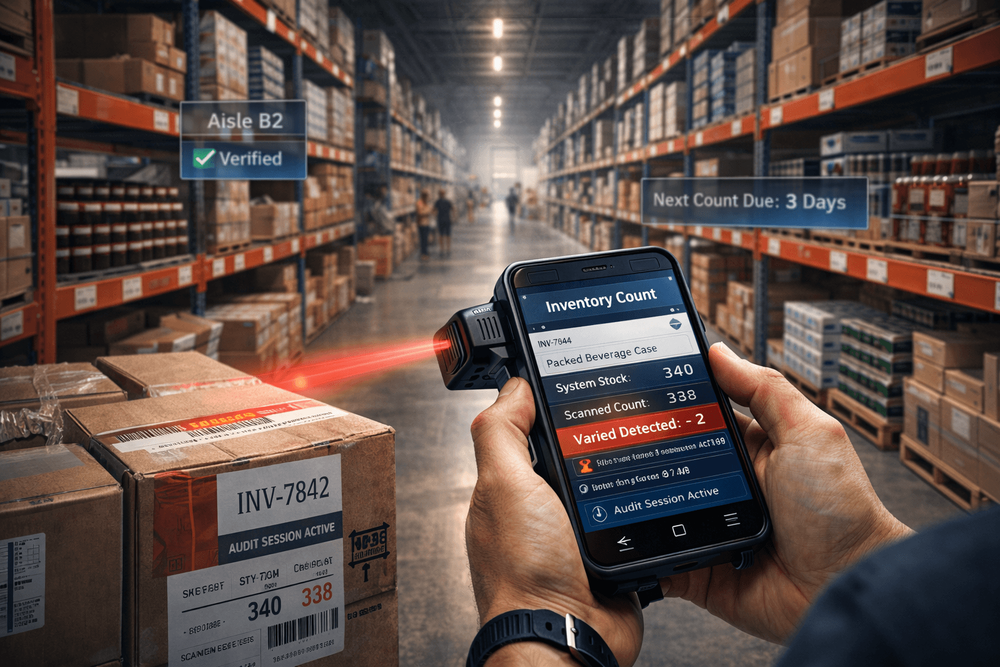
Introduction: The Hidden Cost of Getting Stock Counts Wrong
A retail chain finishes its quarterly stocktake and discovers a 4.2% variance between its system records and physical shelves. That gap translates to thousands of dollars in unaccounted shrinkage, misplaced stock, and over-ordering. The culprit? A manual clipboard-and-spreadsheet process that had not been updated in six years.
This is not an edge case. It is the operational reality for thousands of retail stores, warehouses, and distributors still relying on outdated counting methods.
Inaccurate inventory count data causes overstocking, understocking, customer disappointment, and audit failures. If your business cannot answer "what stock do we actually have, right now?" with confidence, this guide, put together by the team at Stockount ,is for you.
What Is an Inventory Count and Why Does It Matter?
An inventory count also called a stock count or physical inventory audit is the process of physically verifying the quantity of products a business holds against what its records say.
It matters because your purchasing decisions, sales forecasting, and financial reporting all depend on one thing: accurate stock data. When those numbers are wrong, every downstream decision is wrong too.
Common consequences of inaccurate stock counts:
- Phantom stock: items appear available in the system but are missing from shelves
- Dead stock: excess inventory tied up in capital that could be deployed elsewhere
- Shrinkage blind spots: theft and damage go undetected between counts
- Failed audits: financial and compliance reporting becomes unreliable
- Poor customer experience: orders are accepted for stock that does not exist
For supermarkets, stock variance of even 1% across thousands of SKUs can represent significant financial loss. For distributors, inventory mismatches create order fulfillment delays that erode client trust.
What Is an Inventory Counting System?
An inventory counting system is a structured combination of process, technology, and workflow that enables businesses to count, verify, and reconcile physical stock against digital records accurately and efficiently.
A basic system might involve spreadsheets and manual input. A modern inventory counting system goes further — it connects barcode or RFID scanning, real-time data sync, cloud storage, and automated variance reporting into a single, auditable workflow.
The goal is not just to count stock. The goal is to count it fast, catch discrepancies immediately, and produce a reliable audit trail that supports business decisions.
Physical Inventory System vs Digital Inventory Counting
Most businesses start with a physical inventory system: count sheets, pen and paper, and manual data entry. For a business with 50 SKUs and one location, this works. At 500 SKUs, two locations, and high stock turnover, it fails.
| Aspect | Physical Inventory System | Digital Inventory Counting |
|---|---|---|
| Speed | 2–3 days for 5,000 items | Hours with a stock count app |
| Accuracy | 85–90% (human error) | 99%+ with real-time sync |
| Cost | High labor ($500+/count) | Low (app subscription) |
| Visibility | Post-count reports | Real-time inventory tracking |
Physical (manual) inventory systems typically produce:
- Transcription errors from paper to spreadsheet
- Data that is hours or days out of date by the time it is entered
- No real-time visibility into count progress
- No audit trail if figures are disputed later
- Counting duplication or missed zones when multiple staff are involved
Digital inventory counting systems eliminate these failure points by:
- Capturing scan data directly into a central system
- Flagging discrepancies at the point of count, not after
- Allowing managers to monitor count progress in real time
- Generating automated variance and exception reports
- Storing every count record with timestamps and user attribution
The transition from physical to digital is not a luxury. For any business counting more than a few hundred SKUs, it is a risk management decision.
Benefits of Using a Stock Count App or Inventory Count App
A purpose-built stock count app or inventory count app puts a warehouse-grade counting tool directly in the hands of your counting team on a smartphone, tablet, or dedicated scanner.
Key business benefits:
- Speed: Barcode scanning captures stock counts in seconds. A task that took a team two days with clipboards can be completed in hours.
- Accuracy: Scanning eliminates transcription errors. The system records exactly what was scanned, when, and by whom.
- Real-time visibility: Managers can see count progress across zones and locations without being on the floor.
- Immediate exception alerts: If a counted quantity deviates from expected levels beyond a defined threshold, the system flags it instantly — rather than surfacing it during post-count analysis.
- Audit-ready records: Every count session generates a timestamped, user-attributed record. When your finance team or external auditors ask for documentation, it is ready.
- Flexible counting modes: Cycle counts, partial counts, and full physical inventory audits can all be managed from the same platform.
A distribution business that moves to a dedicated inventory count app typically sees stocktake duration cut by 40–60% within the first two count cycles, while simultaneously improving variance detection rates. Platforms like Stockount are designed specifically for this transition, replacing disconnected manual processes with a single, scannable workflow that ops teams can run with minimal training.
Key Features to Look for in an Inventory Counting System
Not all platforms are equal. When evaluating a physical inventory system or count app, prioritize these capabilities:
Barcode and QR Code Scanning
Native scanning support — using a device camera or paired Bluetooth scanner — is non-negotiable. Manual product lookup defeats the purpose of automation.
Real-Time Data Sync
Count data should sync to the central system the moment it is captured. Batch uploads at the end of a count session create a window where errors can propagate undetected.
Audit Trail and Count History
Every count record should carry a timestamp, user ID, location tag, and before/after quantity. This is essential for compliance, dispute resolution, and trend analysis.
Variance Reporting
Automated variance reports should surface high-deviation items and allow managers to initiate recounts on specific zones or SKUs without restarting the entire process.
Multi-Location and Multi-User Support
For businesses with more than one site or multiple counting teams operating simultaneously, the system must support parallel sessions without creating data conflicts.
ERP and POS Integration
A stock count app that cannot connect to your ERP, warehouse management system, or point-of-sale platform creates a manual reconciliation step that reintroduces the errors you are trying to eliminate.
Step-by-Step Inventory Counting Process Using a Digital System
Step 1: Prepare the Count Environment
Freeze stock movements, halt receiving and dispatch if possible — during the count window. Assign zones to specific counters to eliminate duplication.
Step 2: Generate the Count Sheet or Task List
Export the expected stock list from your ERP or inventory system into your count app. Each counter receives their assigned zone with expected quantities pre-loaded (or hidden, for blind counts). In Stockount, this step is automated, the app pulls live stock data and assigns zone-level tasks to each counter without manual export or formatting.
Step 3: Scan and Count
Counters scan each item's barcode. The app records the count against the SKU and location in real time.
Step 4: Review Variances During the Count
As data syncs, the system flags items where counted quantities deviate from expected beyond the defined threshold. Supervisors can dispatch recounts to specific zones immediately.
Step 5: Reconcile and Close the Count
Once all zones are completed, run the variance report. Investigate and resolve exceptions. Approve or adjust records. Lock the count session.
Step 6: Push Updates to the ERP
Sync the verified count data back to your inventory management system. Stock records are updated and the audit trail is preserved.
Common Mistakes Businesses Make During Stock Counts
Counting during peak trading hours: Stock movement during a count creates a moving target. Schedule counts during off-hours or use cycle counting methodology.
Not running a pre-count tidy: Misplaced stock in the wrong bin or aisle creates false variance. A pre-count location audit saves significant reconciliation time.
Relying on a single counter per zone: One counter means no verification. High-value or high-variance zones should be double-counted independently.
Ignoring small variances: A consistent 1–2% variance in the same SKU category month over month signals a systematic problem — counting error, supplier short-shipping, or internal shrinkage. It should not be written off.
Not training staff on the count app: A tool is only as effective as its operator. Fifteen minutes of guided training before a count cycle prevents most data entry issues.
Use Cases: Who Needs a Modern Inventory Counting System?
Retail Stores
High SKU counts, frequent promotions, and seasonal stock swings make manual counting impractical. A stock count app enables cycle counting , rotating through store sections continuously, so retailers maintain accurate stock data without a disruptive full stocktake.
Supermarkets and Grocery
Perishable goods, tight margins, and strict compliance requirements make inventory accuracy critical. Real-time tracking helps supermarkets catch expiry-related shrinkage and reduce waste.
Warehouses and 3PLs
Multiple client inventories, high volume, and complex bin structures demand multi-location support and robust audit trails. A digital inventory counting system provides the verification layer that SLA compliance requires.
Distributors
Inbound verification, picking accuracy, and outbound confirmation all depend on stock count integrity. An inventory count app at each stage of the fulfillment chain catches discrepancies before they become client complaints.
Is Your Current Process Costing You More Than You Think?
Before choosing a system, calculate your current cost of inaccuracy. Take your last full stocktake variance percentage. Apply it to your total inventory value. Then add the staff hours spent on manual counting, reconciliation, and exception chasing.
For most businesses running manual processes, that number is larger than the annual cost of a purpose-built inventory counting system. The question is not whether you can afford to upgrade, it is whether you can continue absorbing the cost of not doing so.
[See How Much Inaccurate Stock Counts Are Costing You - Try a Free Count Session]
How to Choose the Right Inventory Counting System
Define your primary use case first. Are you running full periodic counts, continuous cycle counts, or both? Not every platform handles both models equally well.
Assess your integration requirements. Map every system your count data needs to connect to: ERP, POS, WMS, accounting platform. Confirm native integrations before committing.
Evaluate scalability. A system that handles your current location count and SKU volume must also handle your operation at 2x or 3x scale without requiring a platform migration.
Prioritize mobile usability. Your counting team will use this tool on the warehouse floor. If the interface requires training measured in days, adoption will be poor.
Request a working trial, not just a demo. Run a pilot count on a subset of your actual inventory using the trial system. This surfaces integration gaps and usability issues that no demo environment reveals.
Conclusion: Accurate Stock Counts Start With the Right System
Manual counting processes were designed for a simpler era of retail and warehousing. The businesses that continue to rely on them are not just inefficient, they are operating without the real-time visibility that modern inventory management demands.
A purpose-built inventory counting system with barcode scanning, live data sync, and automated variance reporting does not just make counting faster. It makes your entire operation more reliable, from purchasing decisions to customer fulfillment.
The difference between businesses that control their inventory and those that are controlled by it comes down to one decision: adopting a process that catches errors at the point of count, not weeks later during a financial review.
Every stock mismatch you absorb today is a data problem that compounds tomorrow. The businesses gaining ground on stock accuracy right now are using dedicated tools, not better spreadsheets.
FAQ
What is the difference between a stock count and an inventory audit? A stock count is the physical process of counting items on hand. An inventory audit is a broader verification process that compares count results against purchase records, sales data, and financial figures. A reliable inventory counting system supports both.
How often should a business perform an inventory count? Cycle counting — counting a rotating segment of inventory continuously — is more effective than annual full counts for most businesses. High-velocity SKUs may require weekly cycle counts. Slow-moving items may only need quarterly verification.
Can a stock count app work without internet connectivity? Leading platforms offer offline mode, where scan data is stored locally and synced once connectivity is restored. This is essential for warehouses with patchy or inconsistent coverage. Stockount supports full offline counting — counters can scan an entire zone without a signal, and all data syncs automatically when the device reconnects.
How does real-time inventory tracking differ from a periodic count? Real-time inventory tracking monitors stock levels continuously through point-of-sale, receiving, and dispatch events. A physical inventory count verifies that real-time records match what is actually on the shelf. Both are necessary, one without the other creates blind spots.
What causes inventory shrinkage? Shrinkage results from theft (internal and external), supplier short-shipping, counting errors, spoilage, and administrative mistakes. A consistent audit-based inventory control process is the most effective tool for identifying and addressing each shrinkage source.
What is cycle counting and is it better than a full stocktake? Cycle counting divides inventory into segments and counts each segment on a rotating schedule throughout the year. It avoids operational disruption, catches errors faster, and produces more consistent stock accuracy than a single annual count. For most retail and warehouse operations, a cycle count program supported by a digital inventory counting system is the preferred approach.
Ready to see how Stockount performs on your actual inventory? Schedule a free demo and run a guided pilot count with your own SKUs, your own team, and your own data, before committing to anything. See the variance reports, the audit trail, and the real-time sync working against live stock.
Book Your Free Stockount Demo Today — No setup fees. No long-term contract required.