Inventory Count Guide: Methods, Process & Best Practices for Accuracy
| By Stockount

Inventory Count: Methods, Process & Best Practices
An inventory count is the process of physically verifying the quantity and condition of stock held in a warehouse, store, or distribution center. It reconciles real-world stock levels against what's recorded in your inventory management system. Businesses that skip or rush inventory counts typically face stockouts, overstock situations, inaccurate financial reporting, and costly write-offs. This guide covers every method, step, and best practice you need to run accurate inventory counts whether you manage a single stockroom or a multi-warehouse operation.
What Is Inventory Count?
Inventory count (also called a stock count) is the systematic process of counting all physical goods a business holds at a given point in time. The goal is simple: confirm that what's in your system matches what's actually on your shelves.
Quick Answer: An inventory count is a verification process where warehouse staff physically count products and compare the results to inventory records to identify discrepancies, shrinkage, or data entry errors.
Inventory Count vs. Inventory Audit
These two terms are often used interchangeably, but they're not quite the same:
- Inventory Count — Focuses on physically counting stock quantities. Operational in nature.
- Inventory Audit — A broader review that may include count verification, valuation, process evaluation, and financial reconciliation. Often done for compliance or accounting purposes.
Key Takeaways:
- Inventory counts are tactical and ongoing; audits are strategic and periodic.
- Both are critical for maintaining inventory accuracy.
- Counts feed into audits — you can't have a reliable audit without accurate counts.
Why Is Inventory Count Important?
Inventory inaccuracy is more common than most businesses realize. Research from Auburn University's RFID Lab found that average retail inventory accuracy hovers around 63% meaning more than one-third of inventory records are wrong at any given time. That's a costly problem.
Here's what's at stake when you don't count regularly:
1. Inventory Accuracy
Without regular counts, your system records drift further from reality. This leads to phantom stock (items showing as available when they're not) and ghost inventory (items present but not recorded).
2. Preventing Stockouts
When counts are inaccurate, reorder points trigger too late, or not at all. A retailer selling out of a top SKU during peak season because records showed 50 units in stock (when there were actually 0) is a direct revenue loss.
3. Reducing Overstock and Dead Stock
Overbuying happens when inventory records undercount what's on hand. Regular counts surface slow-moving stock so you can act before it becomes a write-off liability.
4. Improving Demand Forecasting
Forecasting tools are only as accurate as the data they're fed. Clean inventory counts give your planning systems the real numbers they need.
5. Financial Reporting Accuracy
Inventory is a balance sheet asset. Miscounts distort COGS (cost of goods sold), gross margin, and net profit — which creates compliance risks during audits.
6. Warehouse Efficiency
Knowing exactly where products are and how many you have eliminates time wasted searching for items and speeds up order fulfillment.
Types of Inventory Count
Not every business counts inventory the same way. The right method depends on your operation size, product mix, and how often you need updated data.
| Method | Best For | Frequency | Accuracy Level |
|---|---|---|---|
| Full Physical Count | Year-end audits, compliance | Annually or semi-annually | Very High (one-time snapshot) |
| Cycle Counting | Ongoing accuracy maintenance | Daily, weekly, or monthly | High (continuous improvement) |
| Spot Counting | Investigating specific discrepancies | As needed | Moderate (narrow scope) |
| ABC Analysis Count | Prioritizing high-value SKUs | High-frequency for A items | High (risk-weighted) |
Physical Inventory Count
A full physical count stops all warehouse operations and counts every SKU from scratch. It's thorough but disruptive, most businesses do this once or twice a year, typically at fiscal year-end.
Cycle Counting Inventory
Cycle counting divides your inventory into segments and counts a portion on a rotating schedule. Instead of shutting down the warehouse once a year, you count a few hundred SKUs every week. Over time, every item gets counted multiple times per year — without operational disruption.
Spot Counting
Spot counts target a specific product or location when a discrepancy is suspected — for example, after a reported shrinkage event or an unusual sales spike that doesn't match stock depletion.
ABC Inventory Analysis Count
This method classifies SKUs by value and turnover:
- A items — High value, high velocity → count frequently (weekly/monthly)
- B items — Moderate value/velocity → count quarterly
- C items — Low value, slow-moving → count semi-annually or annually
Inventory Counting Methods
Beyond when you count, how you count matters just as much.
| Method | Pros | Cons | Best For |
|---|---|---|---|
| Manual Counting | Low cost, no tech required | Slow, error-prone, labor-intensive | Small businesses, simple operations |
| Barcode Scanning | Fast, accurate, affordable | Requires label maintenance | Most retail and warehouse environments |
| RFID Tracking | Real-time, hands-free, very fast | High upfront cost | High-volume warehouses, apparel, pharma |
| Automated Systems (WMS/IMS) | Continuous tracking, minimal human error | Requires software investment | Mid-to-large operations |
Manual Counting
Teams use paper sheets or basic spreadsheets to tally quantities. It works — but it's the method most prone to human error, duplicate counts, and transcription mistakes. For businesses counting more than a few hundred SKUs, manual counting becomes a significant liability.
Barcode Scanning
Staff use handheld scanners to read barcodes on products or bin locations. The scanner logs counts directly into the inventory system, eliminating manual transcription. This is the most widely adopted method across retail and warehouse operations due to its balance of cost and accuracy.
RFID Tracking
RFID tags allow readers to count dozens of items per second without line-of-sight scanning. A warehouse associate walking an aisle with an RFID reader can capture counts across hundreds of items in minutes. The technology significantly reduces count time and labor costs at scale, though the per-tag and infrastructure costs make it better suited to high-value or high-volume operations.
Automated Inventory Systems
Warehouse Management Systems (WMS) and Inventory Management Software (IMS) can integrate with barcode or RFID hardware to update stock counts in real time as goods move in, out, or across locations. The best systems reduce the need for periodic counts by maintaining perpetual inventory accuracy through every transaction.
Step-by-Step Inventory Counting Process
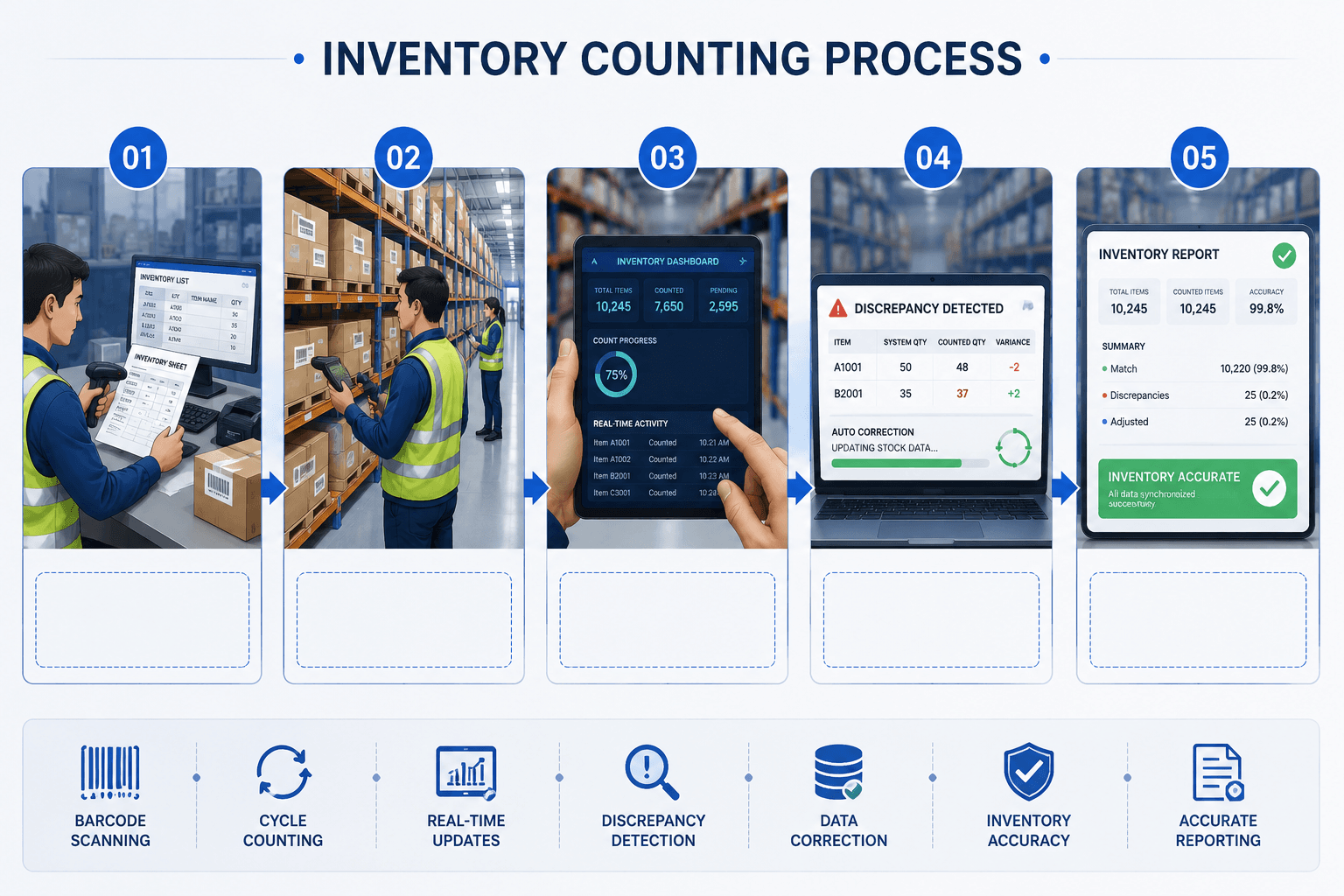
Whether you're running a full physical count or a cycle count, the process follows the same core structure. Here's how to do it right.
Step 1: Prepare Inventory Records
Before anyone touches a product, freeze your system data. Pull current inventory records, flag items that need special attention (recently received shipments, damaged goods holds), and distribute count sheets or load SKUs into your scanning system.
Step 2: Organize the Warehouse
A messy warehouse produces inaccurate counts. Ensure all products are in their correct bin locations, clear aisles are accessible, and items aren't double-stocked in unregistered overflow locations. Label every bin and shelf clearly.
Step 3: Assign Counting Teams
Pair staff into teams of two — one counter, one recorder. This two-person verification reduces errors significantly. Assign each team a specific zone or product category to avoid overlap and missed sections.
Step 4: Count Stock
Begin counting according to your schedule. Count everything in the assigned zone — including partial cases, damaged units, and items awaiting return or disposition. Record exact quantities. Do not round up or estimate.
Step 5: Verify Discrepancies
Compare count results against system records. Flag items where physical counts differ from system quantities by more than your acceptable variance threshold (typically ±1–2%). For flagged items, conduct a blind recount by a second team before making any adjustments.
Step 6: Update the Inventory System
After recounts confirm discrepancies, update your inventory management system with corrected quantities. Document the reason for adjustment where known (shrinkage, receiving error, mislabeling, etc.).
Step 7: Generate Reports and Analyze
Run post-count reports showing accuracy rates by zone, category, and SKU. Track your inventory accuracy percentage over time. Use discrepancy patterns to identify root causes — whether that's a receiving issue, a labeling problem, or a theft hotspot.
.Pro Tips:
- Freeze inventory movements (no shipments in/out) during full physical counts.
- Use a consistent counting direction (e.g., always left-to-right, top-to-bottom per shelf).
- Conduct counts during off-hours or weekends when possible to minimize disruption.
Common Inventory Count Mistakes
Even experienced teams make these errors. Knowing them in advance is half the battle.
Duplicate Counting
Happens when teams overlap zones or items get moved mid-count. Fix: Use zone assignment maps and freeze stock movement during the count window.
Wrong SKU Labels
Products with missing, damaged, or incorrect barcodes get miscounted or logged under the wrong item. Fix: Audit labels before count day and replace damaged labels as part of pre-count prep.
Human Transcription Errors
Manual paperwork introduces errors at every step. Fix: Replace paper count sheets with mobile scanning devices wherever possible.
Poor Warehouse Organization
Disorganized bins mean items are counted twice or missed entirely. Fix: Run a 5S warehouse audit before scheduling your count.
Outdated Inventory Records
Counting against records that haven't been updated with recent receipts or shipments skews every result. Fix: Freeze transactions and reconcile open POs before starting.
Counting While Receiving
Adding new stock mid-count contaminates results. Fix: Establish a clear count blackout window with no inbound or outbound movements.
Most operations teams discover inventory gaps too late, after losses have already >impacted business. Stockount detects discrepancies, shrinkage, and accuracy issues >in real time, so you can fix problems instantly instead of weeks later.
Start real-time inventory tracking and improve accuracy today. Start Free Inventory count + audit →
Inventory Count Best Practices
Implement Barcode or RFID Systems — Eliminate manual transcription and speed up every count cycle.
Run Cycle Counts Continuously — Don't wait for year-end. Regular cycle counts catch problems before they compound.
Use ABC Prioritization — Count your highest-value, fastest-moving items most frequently.
Train Counting Teams Consistently — New staff should shadow experienced counters. Standardize your counting process in a written SOP.
Freeze Inventory Movements During Full Counts — No inbound or outbound during count windows.
Conduct Blind Recounts — Second-team recounts without access to the first count results catch errors more effectively.
Track Inventory KPIs — Monitor inventory accuracy %, shrinkage rate, count variance by zone, and time-to-count metrics over time.
Integrate Counts With Your IMS/WMS — Real-time system updates after every count ensure records stay current.
Document All Adjustments — Every discrepancy adjustment should have a reason code for trend analysis.
Review and Improve After Every Count — Post-count debriefs identify process gaps and improve the next cycle.
How Inventory Management Software Improves Inventory Accuracy
Manual processes have a ceiling. At some point, the volume and complexity of your inventory operations outpaces what spreadsheets and clipboards can handle. That's where inventory management software (IMS) and warehouse management systems (WMS) close the gap.
Real-Time Stock Visibility
Modern IMS platforms update stock levels automatically with every inbound receipt, sales order, transfer, or return. Instead of waiting for the next scheduled count to discover a discrepancy, you catch it in real time.
Automated Stock Updates
Barcode scans and RFID reads feed directly into your system. No manual entry means fewer transcription errors and faster cycle times.
Multi-Warehouse Tracking
For businesses operating multiple locations, a centralized IMS gives a single view of stock across every facility, critical for accurate allocation and transfer decisions.
Reporting Dashboards
Built-in analytics surfaces inventory accuracy rates, shrinkage trends, slow-moving SKUs, and reorder points without building custom reports in spreadsheets.
Reduced Manual Errors
Every automated touchpoint, receiving, putaway, pick, pack, ship reduces the opportunities for human error that degrade inventory accuracy over time.
Use cases where software makes the biggest difference:
- Ecommerce businesses managing hundreds of SKUs across multiple sales channels
- Manufacturers tracking raw materials, WIP, and finished goods simultaneously
- Retailers reconciling in-store and online inventory in real time
- Third-party logistics (3PL) providers managing inventory on behalf of multiple clients
Inventory Count Checklist
Pre-Count Checklist
- Freeze inventory transactions (no inbound/outbound during count)
- Reconcile all open purchase orders and pending receipts
- Print or load count sheets / configure scanning devices
- Audit and replace damaged bin labels
- Assign counting zones to teams
- Brief all counting staff on process and expectations
- Organize warehouse — all items in correct bin locations
- Remove and quarantine damaged/return-pending inventory
During-Count Checklist
- Count from a consistent starting point per zone
- Record exact quantities — no estimating
- Flag items without labels for immediate attention
- Do not move inventory between zones mid-count
- Log all partial cases, damaged units, and non-standard items
- Conduct immediate recount if any figure seems wrong
Post-Count Checklist
- Compare physical counts against system records
- Flag all variances exceeding your threshold
- Conduct blind recounts on flagged items
- Update inventory system with verified adjustments
- Assign reason codes to all discrepancies
- Generate and distribute accuracy report
- Schedule debrief meeting to review findings
- Update SOPs based on lessons learned
Wrapping Up
Accurate inventory counting isn't a back-office formality, it's a core operational discipline that directly impacts revenue, customer satisfaction, and financial integrity. Whether you're running a 500 sq ft stockroom or a 500,000 sq ft distribution center, the fundamentals are the same: count consistently, count correctly, and use the data to improve.
The businesses that get this right don't just avoid stockouts and write-offs. They build the operational foundation for smarter forecasting, leaner purchasing, and faster fulfillment.
Start with a single improvement: move from annual physical inventory counts to monthly cycle counts. Implement barcode scanning if you haven't. Measure your inventory accuracy rate and set a target to improve it by 5% over the next quarter. Small, consistent steps compound into significant operational gains.
Still managing counts with spreadsheets or clipboards? There's a faster, more accurate way. Our inventory audit system platform gives your team real-time stock visibility, automated cycle count scheduling, barcode and RFID integration, and a live accuracy dashboard — all in one system.
Here's what teams typically see within 90 days:
- Up to 35% reduction in inventory discrepancies
- 50% faster count cycles with mobile barcode scanning
- Real-time accuracy reporting across every warehouse location
- Automated reorder alerts — no more manual stock checks
No lengthy setup. No complicated onboarding. Most teams are live within a week. → Book Your Free 30-Minute Demo
See the platform in action with your own inventory scenarios. No commitment required.
Frequently Asked Questions
Q1: What is inventory count?
An inventory count is the process of physically verifying stock quantities in a warehouse or store and comparing the results to recorded inventory levels to identify and correct discrepancies.
Q2: What are the main inventory counting methods?
The four primary inventory counting methods are manual counting, barcode scanning, RFID tracking, and automated inventory management systems. Each offers a different balance of cost, speed, and accuracy.
Q3: How often should inventory be counted?
It depends on your method. Full physical counts are typically done annually. Cycle counts should be done continuously — daily or weekly for high-velocity items (A items), monthly for moderate items, and quarterly or semi-annually for low-turnover stock.
Q4: What is cycle counting inventory?
Cycle counting is a perpetual inventory auditing method where a subset of inventory is counted on a rotating schedule rather than counting everything at once. It allows businesses to maintain ongoing inventory accuracy without shutting down operations for a full physical count.
Q5:Why is inventory accuracy important?
Inventory accuracy directly affects order fulfillment rates, financial reporting, demand forecasting, and customer satisfaction. Inaccurate records lead to stockouts, overstocking, incorrect financial statements, and wasted labor.
Q6: What causes inventory discrepancies?
Common causes include human counting errors, receiving mistakes, mislabeled products, theft or shrinkage, unreported damage, data entry errors, and inventory moved without system updates.
Q7: How do warehouses perform inventory counts?
Warehouses typically freeze stock movements, assign counting teams to specific zones, use barcode scanners or RFID to record quantities, compare counts against system records, investigate variances, and update their inventory management system with corrections.
Q8: What is the best inventory counting method?
For most businesses, barcode scanning combined with cycle counting delivers the best balance of accuracy, cost, and operational continuity. High-volume warehouses benefit from RFID for faster, more frequent counting with less labor.
Q9: What is the difference between a physical inventory count and an inventory audit?
A physical inventory count focuses on verifying quantities of stock on hand. An inventory audit is broader — it includes count verification, valuation assessment, process review, and may be conducted for financial compliance or accounting purposes.
Q10: How does inventory management software help with inventory counts?
Inventory management software automates stock updates, provides real-time visibility, reduces manual data entry, flags discrepancies automatically, and generates accuracy reports, all of which reduce errors and improve the speed and reliability of inventory counting.