Excel vs ERP vs Audit Software: Choosing the Right Tool for Stock Control
| By Stockount
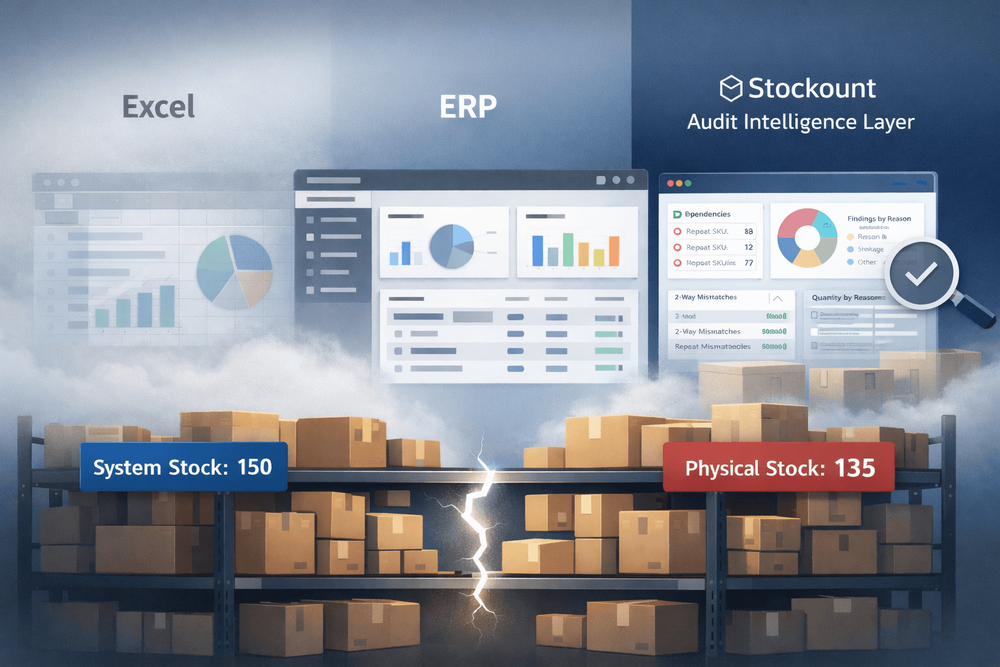
Excel vs ERP vs Audit Software: Why Inventory Systems Fail Without Role Clarity
Most inventory failures are not caused by missing systems. They happen because businesses expect one system to answer questions it was never designed to solve.
Excel, ERP modules, and audit software are often used together, but without clarity on what each tool is responsible for. When inventory mismatches repeat, teams usually blame execution, staff, or counting errors.
In reality, the root cause is usually a tool mismatch.
This article explains how Excel, ERP, and audit software each approach stock control, where they break down, and why growing businesses add audit-focused systems to regain trust in their inventory numbers.
Stock Control Is Not Just About Tracking Numbers
Stock control problems rarely show up as missing data.
They surface as unanswered questions after an inventory mismatch audit, when the numbers no longer align with reality.
Common symptoms include:
- Inventory mismatches after audits
- Unexplained inventory shrinkage
- Repeated SKU-level inventory variance
- Audit cycles that demand heavy effort without improving accuracy
These issues don’t occur because systems fail to record transactions.
They occur because systems fail to explain the gap between physical stock vs system stock—why inventory continues to drift even when processes are followed.
What’s missing is not more data, but stock control visibility: the ability to see where, when, and why inventory variance keeps occurring.
Excel for Stock Control: Flexibility with Limitations
Microsoft Excel remains widely adopted for inventory management due to its accessibility and flexibility. Many teams rely on Excel to get started quickly, build ad-hoc reports, and customize calculations without long implementation cycles.
Strengths of Excel in Inventory Management
Excel is commonly used for manual inventory tracking in small and early-stage operations because it offers:
- Low cost of entry with immediate availability
- Customizable spreadsheets tailored to unique workflows
- Rapid data manipulation using formulas, pivot tables, and macros
- Offline access supporting field operations
Excel enables small teams to manage SKU lists, stock levels, reorder points, and valuation methods with relative ease. For early-stage businesses, it supports foundational inventory tracking without extensive setup.
Operational Constraints of Excel
As transaction volumes grow, Excel’s limitations become evident:
- Manual data entry increases the risk of errors
- Version control challenges across multiple users
- Limited real-time visibility across locations
- Weak audit trails and compliance controls
- Poor scalability under high transaction throughput
Excel works best as a tactical tool, not a strategic platform for enterprise-grade stock control.
ERP Systems: Integrated Control and Enterprise Visibility
Enterprise Resource Planning (ERP) platforms act as centralized inventory systems, connecting stock with procurement, sales, finance, and production.
ERP inventory control moves inventory from isolated record-keeping to integrated operational intelligence.
Core Advantages of ERP for Stock Control
- Real-time inventory visibility across warehouses and channels
- Automated transactions tied to purchasing, sales, and production
- Advanced planning for demand forecasting and replenishment
- Multi-location and multi-entity support
- Robust reporting and analytics
By synchronizing stock movements with financial postings, ERP systems improve valuation accuracy, cost transparency, and overall stock integrity.
ERP Capabilities That Strengthen Inventory Accuracy
- Batch and serial number tracking
- Lot traceability for regulated industries
- Bill of Materials (BOM) integration
- Cycle counting and perpetual inventory
- Automated reorder rules
These features make ERP systems ideal for organizations managing complex supply chains, high SKU volumes, or compliance-driven operations.
Considerations When Implementing ERP
ERP adoption requires:
- Higher upfront investment
- Structured implementation timelines
- Change management and training
While ERP systems improve operational discipline, they do not automatically prevent audit discrepancies. Many organizations still face inventory mismatches after audits.
This raises a critical question:
Does ERP prevent inventory shrinkage or does it simply record it?
Audit Software: Governance, Accuracy, and Compliance
Audit software addresses a dimension of stock control that Excel and ERP do not: independent verification.
Unlike operational systems, audit tools are not designed to run daily inventory transactions. They exist to validate accuracy, enforce controls, and provide assurance.
By operating separately from transactional systems, audit software increases trust in inventory data without disrupting operations.
Key Functions of Audit Software in Inventory Control
- Automated audit trails capturing every stock movement
- Exception detection for variances and anomalies
- Compliance reporting aligned with regulatory frameworks
- Reconciliation of physical counts vs system records
- Continuous monitoring for internal controls
Audit software ensures inventory records can withstand scrutiny from internal auditors, external auditors, and regulators.
Strategic Value of Audit Software
Organizations across:
- Auditing firms
- Manufacturing
- Pharmaceuticals
- Food distribution
- Retail
use audit software to:
- Reduce shrinkage and fraud
- Strengthen internal controls
- Improve inventory accuracy metrics
- Support governance and risk frameworks
Rather than duplicating ERP functionality, audit software strengthens ERP by validating data integrity and highlighting where control breaks down.
What Stockount Focuses On
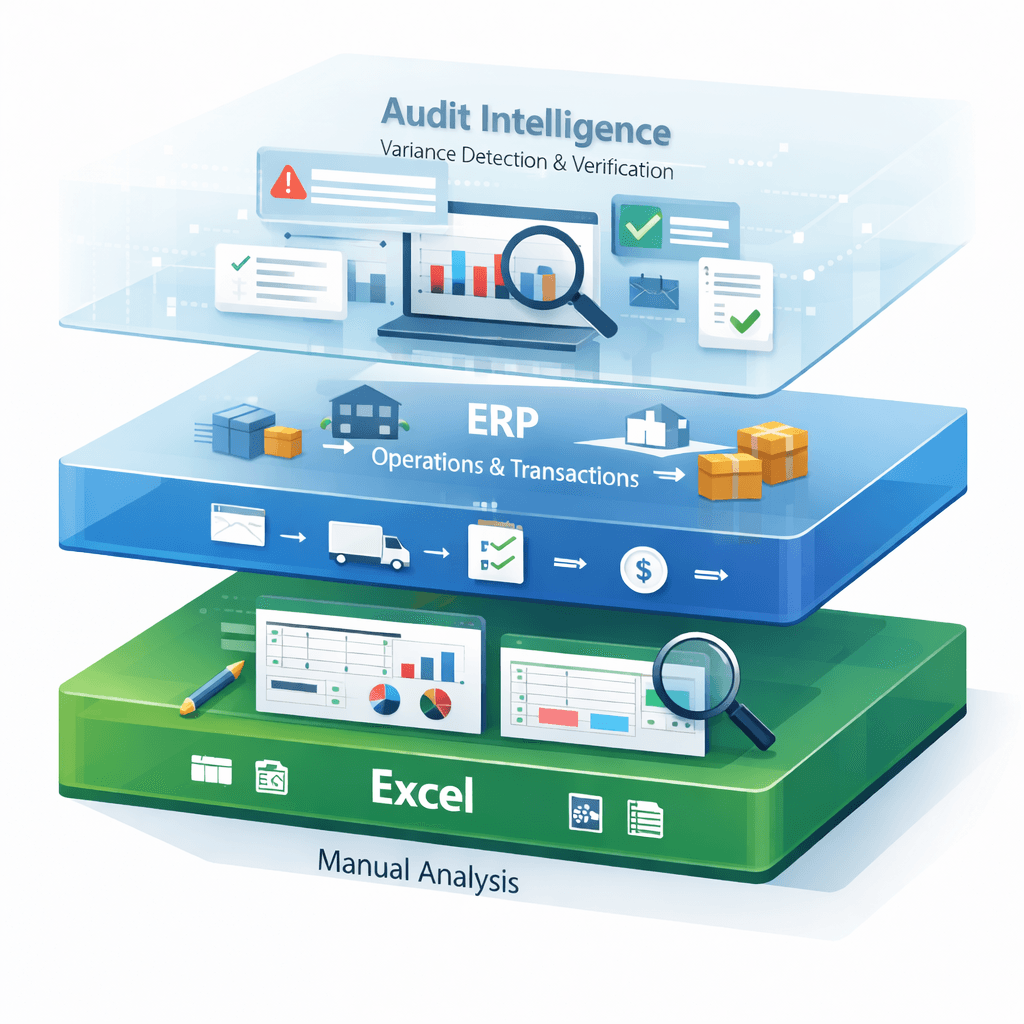
Stockount is designed to close the visibility gap between ERP inventory records and physical stock reality.
It does not replace ERP systems or Excel-based analysis.
Instead, Stockount acts as an audit intelligence layer, separating verification from operations.
Stockount helps teams understand not just that variances exist—but why they keep recurring.
By reinforcing accountability and surfacing repeat discrepancies, audit software transforms inventory audits from a compliance task into a source of operational insight.
Comparative Analysis: Excel vs ERP vs Audit Software
A structured comparison clarifies the role of each tool in modern stock control ecosystems.
| Dimension | Excel | ERP | Audit Software (Stockount) |
|---|---|---|---|
| Primary role | Data tracking | Operational control | Verification & assurance |
| Real-time visibility | ❌ | ✅ | ✅ |
| Audit trail | Weak | Moderate | Strong |
| Root-cause analysis | Manual | Limited | Built-in |
| Repeat variance detection | ❌ | ❌ | ✅ |
| Scalability | Low | High | High |
| Best suited for | Early-stage teams | Operational scale | Accuracy & governance |
When Businesses Add** Audit-Focused Systems** Like Stockount
Organizations typically introduce audit software when they experience:
- Repeated SKU-level mismatches
- Inventory shrinkage without evidence-based explanations
- High audit effort with little improvement in accuracy
- Pressure from management, auditors, or regulators
At this stage, the stock control question shifts:
“How do we record inventory?”
to
“How confident are we in our inventory numbers?”
This is where audit software becomes strategic rather than optional.
The Modern Stock Control Stack
Mature inventory operations rarely rely on a single tool.
Instead, they use a layered approach:
- Excel for quick analysis and ad-hoc checks
- ERP for daily inventory operations and financial integration
- Stockount for audit clarity, variance intelligence, and accountability
Separating operations from verification ensures audits actually improve accuracy instead of merely documenting problems.
Conclusion: Choosing the Right Tool for the Right Question
ERP systems operate inventory at scale, recording transactions with real-time discipline.
Audit software exists to verify inventory accuracy, explain mismatches after audits, and expose repeat inventory variance.
Stockount turns audits into insight by bridging the gap between physical stock vs system stock, helping teams understand why discrepancies persist and where inventory shrinkage originates.
If recurring mismatches feel familiar, the issue may not be execution alone. More often, the existing toolset records what happened but lacks the stock control visibility needed to explain why inventory keeps drifting. That’s where audit-focused inventory systems become essential, not optional.
Inventory Questions Explained (FAQ)
What is the difference between Excel, ERP, and audit software for stock control?
Excel is used for manual stock tracking and basic analysis. ERP systems manage real-time inventory operations across purchasing, sales, and finance. Audit software independently verifies inventory accuracy by detecting mismatches, repeat variances, and control gaps.
Growing businesses often use all three together to balance flexibility, operational control, and audit confidence.
Is Excel enough for stock control?
Excel works for small teams and early-stage businesses but lacks audit trails, real-time visibility, and scalability. As inventory volume grows, Excel alone cannot reliably explain audit mismatches or prevent repeat variances.
Can ERP replace audit software?
No. ERP systems record transactions and manage operations, but they are not designed to independently verify inventory accuracy or explain recurring audit failures.
Audit software complements ERP by focusing on assurance and variance analysis.
When should a business use audit software?
Businesses typically add audit software when they see repeated SKU mismatches, unexplained shrinkage, high audit effort, or low confidence in inventory numbers despite having ERP systems in place.