Inventory Reconciliation Software vs. Spreadsheets: Which Wins in 2026?
| By Stockount
Keeping your stock records accurate isn't optional — it decides whether your financial reports are trustworthy, whether customers get what they ordered, and whether you're bleeding margin without knowing it. For years, Excel and Google Sheets were the default tool for reconciling inventory. But as SKU counts grow and stock spreads across more locations, more and more businesses are finding that spreadsheets quietly become the bottleneck.
This article breaks down exactly where spreadsheets still hold up, where inventory reconciliation software pulls ahead, and how to tell which stage your business is at.
What Is Inventory Reconciliation?
Inventory reconciliation is the process of comparing your recorded stock levels — in a system or a spreadsheet — against what's physically on your shelves. The goal is simple: find discrepancies, figure out why they happened, and correct the records before they distort your numbers.
Done well, reconciliation gives you:
- Fewer stockouts and less overstocking
- Financial reports you can actually trust
- Lower shrinkage and unexplained loss
- Better purchasing and demand forecasting A dedicated inventory audit platform automates most of this. A spreadsheet makes you do it by hand, every time.
Why Businesses Are Still Debating This
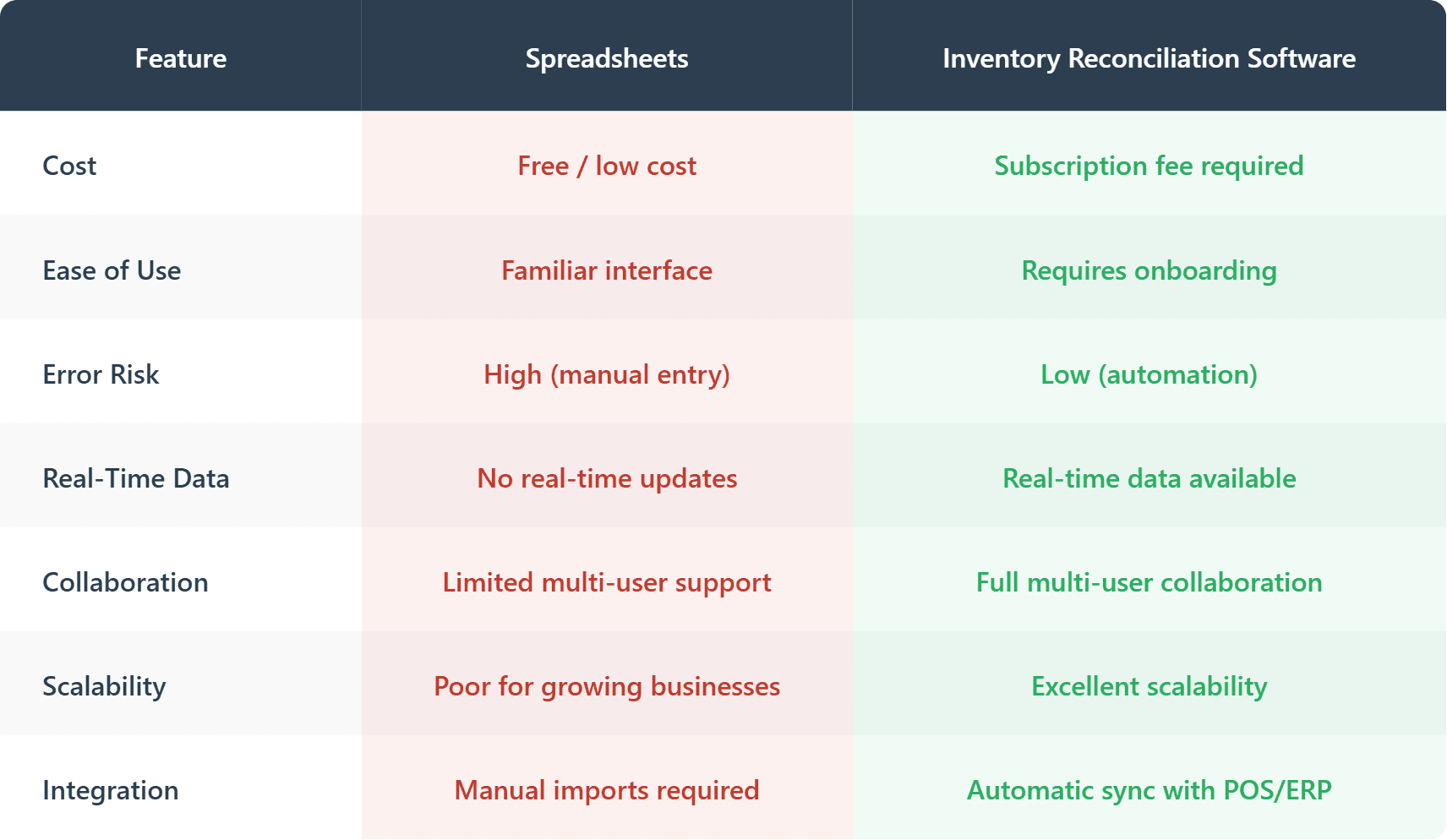
Spreadsheets are cheap, familiar, and flexible — that's not nothing. Reconciliation software, on the other hand, automates the matching process, connects directly to your sales and purchasing systems, and reports in real time — but it comes with a subscription and a short learning curve. Here's how the trade-off actually breaks down.
Spreadsheets for Inventory Reconciliation
Where spreadsheets still win
Low cost. Most businesses already have Excel or Google Sheets — no new subscription needed for basic use.
Full customization. You can build your own formulas, pivot tables, and templates exactly how you want them. For a one-off project or a very small stock list, that flexibility is genuinely useful.
Zero learning curve. Your team already knows how to open a spreadsheet. No onboarding required.
Works offline. No internet dependency — useful in low-connectivity locations.
Where spreadsheets break down
Errors compound silently. A single typo or broken formula can throw off an entire reconciliation, and nothing flags it for you.
They eat time. Counting, entering, and matching stock manually can take hours — or days — once you're past a handful of SKUs or more than one location.
Collaboration gets messy. Even with Google Sheets, version control between multiple staff members quickly turns into duplicate files and conflicting numbers.
Data is always stale. Spreadsheets don't sync with your POS, purchasing, or warehouse systems, so you're reconciling against numbers that were already out of date the moment you opened the file.
They don't scale. Once you're managing thousands of SKUs across multiple warehouses, a spreadsheet stops being a tool and starts being a liability.
Still reconciling stock in a spreadsheet every week?
If you've ever spent an afternoon hunting for one broken formula in a 40-tab inventory sheet, you already know the real cost isn't the software subscription — it's the hours you're not getting back.
See what reconciliation looks like without the spreadsheet. Start your free 15-day trial → No credit card required.
Inventory Reconciliation Software
What you gain
Automation. Software pulls data directly from your POS, ERP, or e-commerce platform and matches it against physical counts — no manual re-entry, far fewer human errors.
Real-time accuracy. Stock levels update the moment a sale, return, or purchase happens. You're always working with live numbers, not a snapshot from last week.
Mobile and barcode-first counting. Staff count with a phone or barcode scanner instead of a clipboard, and the system updates instantly.
One dashboard, any scale. Whether you run one store or fifty warehouses, everything reconciles into a single view — multi-location complexity stops being your problem to manage manually.
Built-in reporting. Discrepancy reports, audit trails, and forecasts are a click away — useful both for daily decisions and for standing up to a financial audit.
Role-based collaboration. Multiple people can work at once with permissions that keep the data clean and the accountability clear.
One source of truth. Reconciliation software typically integrates with your accounting, procurement, and sales systems, so numbers don't drift apart between departments.
Automatic discrepancy flags. Most platforms now flag unusual variances on their own — you're alerted to a problem instead of hunting for one.
The trade-offs
It costs money. Subscription pricing usually scales with users, locations, or SKU volume.
Some onboarding is unavoidable. Even intuitive tools need a short ramp-up for new workflows.
You depend on your vendor. Most solutions are cloud-based, so you need reliable internet and a provider you trust.
Less ad-hoc flexibility. You won't get the same build-anything freedom as a blank spreadsheet without paying for customization.
Inventory Reconciliation Tool Comparison
What's Pushing More Businesses Toward Software in 2026
A few shifts are tipping the balance:
- AI-assisted anomaly detection — more platforms now catch unusual stock discrepancies automatically, before they compound.
- A mobile-first floor staff — teams increasingly expect to count on a phone, not a clipboard.
- Distributed and hybrid operations — centralized cloud systems are simply more practical than emailing spreadsheets between locations.
- Rising audit and compliance pressure — regulators and stakeholders expect records that are accurate and traceable, not reconstructed after the fact. Spreadsheets can still make sense for a microbusiness with minimal stock. Past that point, the cost of errors and lost time usually outweighs a software subscription.
How to Decide for Your Business
Ask yourself:
- How many SKUs and locations am I actually managing?
- How often do I need to reconcile — weekly, monthly, real-time?
- How much does accuracy matter for financial reporting or compliance?
- What does a stock discrepancy actually cost me, versus what the software costs? If you're small and stable, spreadsheets can hold for now — just plan your transition point. If you're already juggling thousands of SKUs or multiple sites, dedicated reconciliation software will almost certainly save you more than it costs.
Frequently Asked Questions
Is inventory reconciliation software worth it for a small business?
For very small operations with under a few hundred SKUs, spreadsheets can still work. Once you're tracking multiple product categories or locations, though, software usually pays for itself within the first month through time saved and fewer stock write-offs.
When should a business switch from Excel to inventory reconciliation software?
The usual tipping point is when reconciliation starts taking more than a few hours per cycle, when more than one person needs to update the same sheet, or when stock spans more than one location.
Can Google Sheets be used for inventory reconciliation?
Yes, for very small inventories. But Google Sheets has no built-in barcode scanning, no automatic sync with your POS or ERP, and no real-time discrepancy detection — every mismatch has to be found and fixed manually, which doesn't scale past a handful of SKUs.
What are the risks of using spreadsheets for inventory reconciliation?
The biggest risks are manual entry errors, broken formulas that go unnoticed, version conflicts when multiple people edit the same file, and stale data since spreadsheets don't sync live with sales or purchasing systems. These issues often stay hidden until a financial audit or a stockout exposes them.
How much time does inventory reconciliation software save compared to spreadsheets?
Businesses switching from manual spreadsheet reconciliation to dedicated software typically report cutting reconciliation time by 60-70%, since barcode scanning and automatic system sync remove most of the manual data entry and cross-checking work.
Does Stockount integrate with my existing ERP or POS?
Yes — Stockount connects natively with Tally, Zoho, SAP, QuickBooks, and Dynamics 365, so you keep your existing system and only fix the counting and reconciliation layer.
Can I try Stockount before paying?
Yes, Stockount offers a free trial with full feature access and no credit card required.
The Bottom Line
Spreadsheets still win on cost and flexibility for very small operations. But for any business with real inventory volume or compliance requirements, dedicated software wins decisively — fewer errors, faster counts, live data, and systems that actually talk to each other.
If you're ready to move past spreadsheets, Stockount's inventory reconciliation software gives you mobile-based stock audits, real-time discrepancy reporting, and integration with the systems you already use — Tally, Zoho, SAP, QuickBooks, and Dynamics 365. Try it free and see how much time you get back.
Ready to Stop Reconciling By Hand?
You've seen where spreadsheets hold up and where they quietly cost you time, accuracy, and peace of mind. If your business has outgrown the spreadsheet stage, the fix isn't more formulas, it's a system that reconciles for you.
Stockount connects to the ERP you already use — Tally, Zoho, SAP, QuickBooks, or Dynamics 365 — and reconciles stock in real time with barcode scanning, instant discrepancy alerts, and audit-ready reports.
Book a 20-minute demo → and see your own inventory data reconciled live, not a generic walkthrough.