Inventory Accuracy Software: How to Choose the Right System for Reliable Stock Counts
| By Stockount
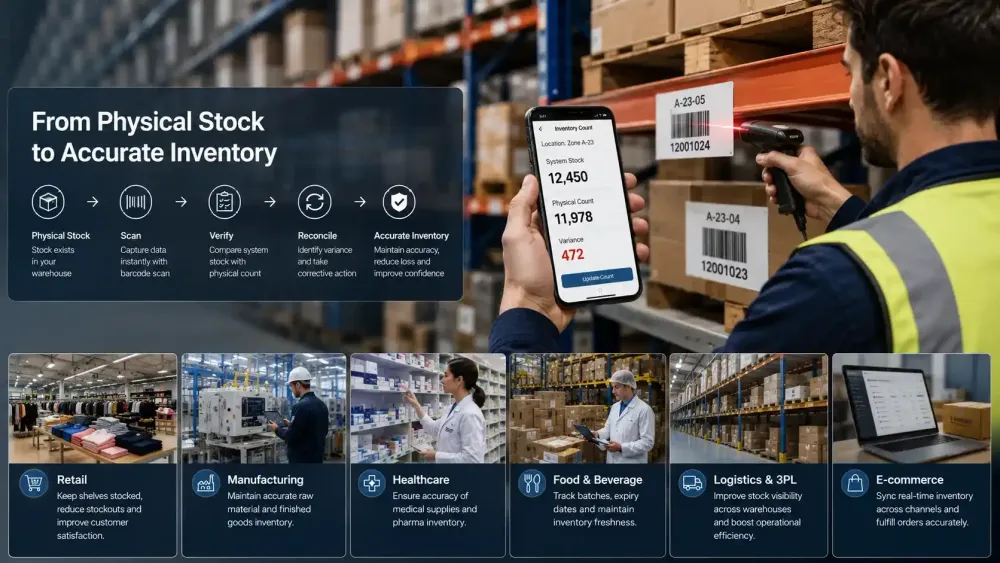
Picture a routine stock check: the ERP shows 12,450 units on hand. The physical count comes back at 11,978 a variance of 472 units, with no immediate explanation.
That gap isn't the real problem. The real problem is what happens next: Where did the discrepancy happen? Who counted it, and was that count validated? Was it reconciled, or just written off? Is there an audit trail finance can actually review? And would this process hold up across five warehouses instead of one?
Unreliable inventory data affects order fulfillment, purchasing, warehouse labor, working capital, and customer service. Inventory accuracy software brings structure to counting, verification, discrepancy detection, and reconciliation, so variances like the one above become traceable events instead of recurring mysteries.
Do You Actually Need Inventory Accuracy Software?
Not every business needs dedicated software immediately. A single-location operation with a few hundred SKUs and infrequent discrepancies can often manage with disciplined spreadsheet processes. The need usually shows up gradually, then all at once.
You may need software when:
- You operate multiple warehouses or store locations
- You're managing thousands of SKUs across categories
- Stock discrepancies show up repeatedly, not occasionally
- Physical counts take days instead of hours
- You need a large team to complete a single count cycle
- Excel has become the primary system of record, not a supporting tool
- Stock adjustments happen frequently without a clear root cause
- Audit visibility is limited — you can't easily see who counted what, or when
- Tracking inventory by specific location or bin is difficult
- Stockouts happen even when the system shows available stock If three or more sound familiar, manual processes are likely costing more in labor, errors, and lost sales than a structured system would.
What Does Inventory Accuracy Software Actually Do?
At its core, inventory accuracy software formalizes one workflow: Count → Scan → Validate → Compare → Detect Variance → Reconcile → Report.
Each step matters commercially. Scanning replaces manual tallying with verifiable data capture. Validation confirms a count was performed correctly, not just submitted. Comparison checks results against system records automatically instead of by hand. Variance detection flags discrepancies immediately rather than at month-end. Reconciliation closes the loop with a documented resolution, and reporting turns all of it into something a manager or auditor can review.
The value isn't the software itself, it's what the business gets back: fewer hours chasing discrepancies, faster financial close, and stock data that purchasing and fulfillment teams can trust.
What Features Should You Look for in Inventory Accuracy Software?
Essential Features
- Barcode scanning — removes manual entry errors during counting
- QR scanning — supports flexible labeling across inventory types
- Mobile counting — lets teams count from the floor, not a desk
- Offline counting — keeps counting functional without connectivity
- Physical stock verification — confirms what's actually on the shelf
- Inventory reconciliation — turns variance data into resolved outcomes
- Multi-location support — consolidates counts into one view
- User permissions — controls who can count, approve, or adjust
- Audit history — provides a reviewable trail for compliance
- Variance reporting — surfaces discrepancy patterns, not one-off numbers
Advanced Features
- Photo validation — visual evidence for dispute resolution
- Serialized inventory — item-level traceability
- Batch inventory — lot-level traceability and recalls
- Expiry tracking — flags stock before it becomes unsellable
- Cycle counting — rotating counts instead of annual counts alone
- Cross-location audits — compares standards across sites
- Exception management — routes unresolved variances automatically
- Real-time synchronization — reflects counts the moment they happen
- ERP integrations — connects counted data to finance systems
- Reporting — a consolidated accuracy picture without manual work
Treat the essential list as a baseline and the advanced list as a fit check against your operation.
Still relying on manual inventory counts?
See how Stockount can help your team scan, count, verify, and reconcile inventory through a mobile-first workflow.
Start Free Inventory Audit Trial 15-day free trial. No credit card required.
Inventory Accuracy Software vs Excel
| Capability | Excel / Manual | Inventory Accuracy Software |
|---|---|---|
| Manual data entry | Required | Minimized via scanning |
| Barcode scanning | Not supported | Built in |
| Mobile counting | Limited or none | Native |
| Offline counting | Not applicable | Supported |
| Multiple counters | Difficult to coordinate | Managed concurrently |
| Multi-location audits | Manual consolidation | Centralized |
| Variance detection | Manual comparison | Automated |
| Audit history | Inconsistent | Structured and reviewable |
| Reconciliation | Separate, manual step | Built into the workflow |
| Reporting | Manually compiled | Generated automatically |
| Scalability | Limited | Designed to scale |
When Excel can still work: a single location, a manageable SKU count, infrequent counts, and a small team following a consistent process.
When Excel starts becoming a risk: once counts involve multiple people working from different file copies, locations multiply, or discrepancies recur without a clear pattern. The risk isn't the tool — it's the lack of a shared, verifiable process behind it.
How to Evaluate Inventory Accuracy Software Before Buying
Look beyond the feature list on a vendor's website. Consider: mobile usability, barcode/hardware fit, offline capability, multi-location workflows, audit trail depth, variance handling, batch or serialized inventory support, reporting clarity, ERP integrations, user permissions, implementation effort, ongoing support, pricing fit, and — critically — trial availability.
Questions to Ask Before Choosing a Vendor
- Can our team count without an internet connection?
- Can multiple users count simultaneously without conflicting data?
- Can the system identify physical-versus-system variance automatically?
- Can managers review a complete audit history, not just current stock levels?
- Can we manage multiple inventory locations from one account?
- Can the software support batch or serialized inventory if we need it later?
- Can it integrate with our existing ERP or accounting system?
- Can we test the software with a real inventory count, not just a guided demo? That last question matters most. A guided demo shows how software is supposed to work; a real count with your SKUs and team shows how it actually performs.
Who Benefits Most From Inventory Accuracy Software?
Retail: High SKU volume, recurring discrepancies → needs fast, repeatable counting → fewer stockouts and reliable shelf-to-system matching.
Warehousing: Large volumes, location-level counting → needs bin- and zone-level tracking → faster, less disruptive counts.
Manufacturing: Raw materials, components, and finished goods moving simultaneously → needs accuracy across production stages → fewer delays from missing components.
Distribution: High SKU volume, frequent movement → needs real-time variance detection → tighter control over fast-moving inventory.
3PL: Multiple customers, different inventory structures → needs segmented, auditable counts per client → defensible records when clients dispute stock levels.
FMCG: Batch- and expiry-sensitive inventory → needs lot tracking and expiry alerts → less write-off from expired or misplaced stock.
Multi-location businesses: Inconsistent standards across branches → needs one standardized audit process → comparable accuracy data across every site.
When Should You Move Beyond Manual Inventory Counting?
Stage 1 — Small operation: manual counting is often sufficient with a small SKU count and a single location. Stage 2 — Growing SKU volume: spreadsheets become harder to maintain as product lines expand. Stage 3 — Multiple counters or locations: coordinating counts introduces version-control and consistency problems. Stage 4 — Frequent variances: investigating and reconciling discrepancies starts consuming real staff time. Stage 5 — Large-scale operations: a structured system becomes increasingly valuable for maintaining consistent standards.
There's no fixed threshold, but if discrepancy investigation is becoming a recurring line item on someone's weekly task list, that's usually a sign worth acting on.
How Stockount Helps With Inventory Accuracy
Stockount is built around the counting and reconciliation workflow described above, with a mobile-first approach for warehouse and multi-location teams. Relevant capabilities include mobile-first inventory audits, barcode and QR scanning, offline counting, photo validation, and real-time reconciliation, alongside quick audits, complete audits, cycle counts, cross-location audits, and unit, serialized, and batch inventory tracking, plus integrations to connect counted data with existing systems.
Whether Stockount is the right fit depends on your mix of locations, SKU types, and counting frequency, which is exactly what a trial count is meant to confirm before you commit.
Inventory Accuracy Metrics Buyers Should Monitor
A few metrics are worth tracking regardless of which software you choose: inventory accuracy %, quantity variance, SKU accuracy (which items are chronically wrong), location accuracy (which sites underperform), count completion rate, audit completion time, and adjustment frequency. Software makes these easier to monitor by generating them automatically instead of requiring manual compilation — but the metrics matter more than which tool produces them.
FAQ
Q1: What is inventory accuracy software? Inventory accuracy software is a system that helps businesses count, verify, and reconcile physical stock against recorded inventory data, using tools like barcode scanning, mobile counting, and automated variance detection.
Q2: What features should inventory accuracy software have? At minimum, look for barcode scanning, mobile and offline counting, multi-location support, audit history, and variance reporting. Advanced needs may include batch tracking, serialized inventory, and ERP integration.
Q3: Is inventory accuracy software better than Excel? For small, single-location operations, Excel can work. Once counting involves multiple locations, teams, or frequent discrepancies, dedicated software typically reduces errors and reconciliation time significantly.
Q4: Can inventory accuracy software support multiple warehouses? Yes, most inventory accuracy software is designed to manage counts across multiple warehouses or stores from a single, centralized view, standardizing the process across every location.
Q5: Can inventory accuracy software work offline? Many platforms, including Stockount, support offline counting so warehouse teams can continue working in low-connectivity areas, syncing data automatically once a connection is restored.
Q6: Can inventory accuracy software integrate with ERP systems? Most inventory accuracy platforms offer integrations with common ERP and accounting systems, though the specific integrations available vary by vendor and should be confirmed during evaluation.
Q7: How much does inventory accuracy software cost? Pricing varies by vendor, typically based on number of users, locations, or SKU volume. It's best confirmed directly with the vendor based on your specific operational scale.
Q8: How can I test inventory accuracy software before buying? Look for vendors offering a free trial, and test it with a real inventory count using your own SKUs and team rather than relying solely on a guided sales demo.
Ready to Improve Your Inventory Accuracy?
Your inventory system is only as reliable as the stock data behind it. See how Stockount helps teams count, verify, reconcile, and audit inventory across locations.