Inventory Audit Taking Too Long? 10 Proven Ways to Speed It Up Without Sacrificing Accuracy
| By Stockount
Hook Story
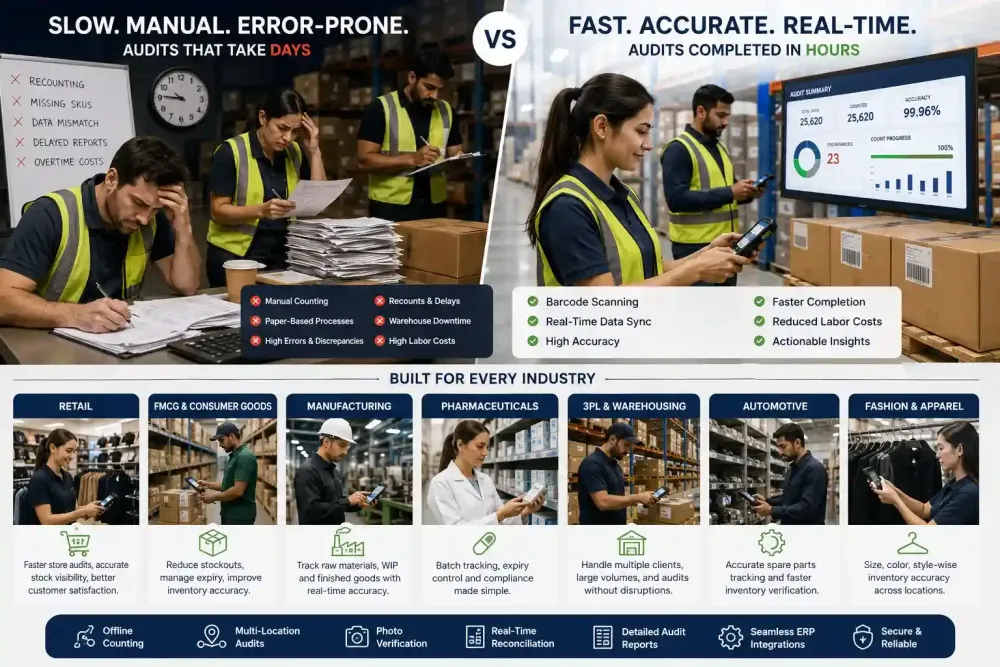
The audit was scheduled to wrap up by 6 PM Saturday. By 9 PM, the warehouse floor still had three teams recounting the same rack because the numbers on Bin 14-C didn't match the sheet and nobody could say whether the sheet was wrong or the count was. Forklifts sat idle waiting for the aisle to clear. Two SKUs turned up "missing" that were actually mislabeled two shelves over. Overtime got approved twice. By Monday morning, the discrepancy report still wasn't reconciled, and the ops manager was explaining to leadership why an eight-hour audit had eaten most of the weekend.
If that sounds familiar, you're not running a badly managed warehouse, you're running a fairly typical one. Slow inventory audits aren't usually a people problem. They're a process problem, and it's a solvable one.
Introduction
Every warehouse manager has lived some version of this story: a count that should take hours stretches into days, discrepancies pile up faster than anyone can resolve them, and the "final" number still gets a mental asterisk. The frustrating part is that most of the time lost isn't spent counting, it's spent recounting, searching, re-entering, and cross-checking. This article breaks down exactly why inventory audits take too long, what that delay actually costs, and ten changes, process and technology — that experienced operations teams use to speed up inventory audits without cutting corners on accuracy.
Quick Answer
Inventory audits usually take too long because of manual inventory counting, poor SKU location visibility, and recounts triggered by human error rather than actual stock issues. The fastest way to shorten audit time is to replace paper or spreadsheet counting with barcode inventory software, run cycle counting instead of only full counts, and reconcile inventory discrepancies in real time instead of after the count ends.
Why Inventory Audits Take Too Long
Most slow audits share the same root causes:
- Manual inventory counting and paper sheets — every count has to be transcribed later, which doubles the work and introduces transcription errors.
- Poor bin and location accuracy — teams waste time walking to the wrong location or searching for stock that's been moved but not updated in the system.
- No real-time inventory visibility — supervisors can't tell which zones are done, which creates duplicate counts or missed ones.
- Inventory discrepancies from unclear ownership — when two people count the same SKU differently and there's no audit trail, the only fix is a third recount.
- Full physical counts instead of cycle counting — counting the entire warehouse at once concentrates all the pain into one long event instead of spreading it out, and is a major source of warehouse audit delays.
- Batch, expiry, or serial tracking done by hand — pharmacy and FMCG operations lose significant time manually verifying batch numbers against paper logs. None of these are staffing problems. They're workflow gaps caused by inventory bottlenecks in the process itself, and each one compounds the others.
The Hidden Cost of Slow Inventory Audits
A long audit doesn't just cost the hours it runs over — it costs:
- Overtime wages for staff held back to finish counts that should have closed on time
- Delayed shipments when outbound orders wait on a warehouse that's mid-audit
- Customer dissatisfaction from stockouts or delayed fulfillment caused by unresolved discrepancies
- Production interruptions, for manufacturers who can't pull confirmed stock until the count closes
- Lost sales when "available" inventory turns out to be miscounted or misplaced
- Compounding inventory inaccuracies, since unresolved discrepancies get carried into the next cycle
- Employee fatigue, which itself increases counting errors — a feedback loop that makes the next audit slower too
- Delayed decision-making, since finance and planning teams wait on numbers they can't fully trust until reconciliation is done The real cost of a slow audit isn't the audit day. It's everything downstream that waits on accurate numbers.
10 Proven Ways to Speed Up Inventory Audits
1. Replace Paper Count Sheets with Barcode or Mobile Scanning
- Challenge: Paper sheets require a second transcription step, and handwriting errors are hard to catch until reconciliation.
- Why it works: Barcode scanning logs an exact SKU and quantity instantly — no interpretation, no re-entry. This is the single biggest lever for digital inventory audit speed.
- Common mistake: Switching to scanning but keeping the same recount-heavy process, so gains get eaten by old habits.
- Real-world example: Velavan Motorcycles, a 15-year Royal Enfield dealer operation, cut its audits from 7 days to 2 — a 70% reduction — after moving from manual counting to barcode and tablet-based scanning.
- Outcome: Fewer transcription errors, faster count-to-reconciliation time.
- Implementation tip: Pilot scanning in one high-traffic zone before rolling it out warehouse-wide.
2. Move from Full Physical Counts to Cycle Counting
- Challenge: Counting everything at once creates a single high-pressure event with no room for correction.
- Why it works: Cycle counting a rotating subset of SKUs regularly spreads the workload and catches errors before they accumulate — the core of most inventory audit automation strategies.
- Common mistake: Cycle counting high-value items only, while fast-moving low-value SKUs quietly drift out of accuracy.
- Real-world example: Lumino Industry, a wires and cables manufacturer, now audits 7–8 storage locations in a single day using tablet-based cycle counts, cutting reconciliation time from months to a single day.
- Outcome: Smaller, more manageable counts and earlier error detection.
- Implementation tip: Prioritize cycle frequency by SKU velocity and value (ABC analysis).
3. Fix Bin and Location Accuracy First
- Challenge: Teams lose time hunting for stock that's in the system but not physically where it's supposed to be.
- Why it works: Accurate location data — a core piece of inventory visibility — means counters go straight to the right spot instead of searching.
- Common mistake: Auditing inventory quantity without first auditing location accuracy.
- Real-world example: Atlas Distribution, a 3PL running audits across 8 warehouses and 25+ client brands, moved off scattered spreadsheets to a single source of truth for location and stock data.
- Outcome: Fewer wasted walks, faster physical counts.
- Implementation tip: Run a quick location-accuracy spot check before the full audit begins.
4. Give Supervisors Real-Time Progress Visibility
- Challenge: Without live status, supervisors can't tell which zones are counted, in progress, or skipped.
- Why it works: A live audit dashboard prevents duplicate work and flags stalled zones immediately.
- Common mistake: Relying on verbal check-ins that go stale within the hour.
- Real-world example: Northbound Bicycles, auditing stock across 200+ dealers plus D2C and Amazon channels, replaced four conflicting stock "truths" with one shared, live view.
- Outcome: No blind spots, faster identification of bottlenecks.
- Implementation tip: Assign one person per shift to actively monitor progress, not just run reports afterward.
5. Reconcile Discrepancies as They're Found, Not After
- Challenge: Waiting until the end of the count to reconcile means every inventory discrepancy competes for attention at once.
- Why it works: Real-time reconciliation while the context is fresh is faster than reconstructing it days later.
- Common mistake: Treating reconciliation as a separate phase instead of a parallel one.
- Illustrative example: A grocery warehouse handling expiry-based stock cut its post-audit reconciliation window from three days to one by resolving flagged mismatches on the same shift.
- Outcome: Shorter total audit-to-close time.
- Implementation tip: Set a rule that any variance above a set threshold gets flagged for immediate review, not end-of-day batching.
If your team still relies on spreadsheets, printed count sheets, or manual reconciliation, it may be time to evaluate a digital approach. Stockount offers a 15-day free trial — no credit card required — so operations teams can experience barcode-enabled inventory audits before making a long-term commitment.
6. Standardize Counting Roles and Ownership
- Challenge: When anyone can count anything, disputed numbers have no clear owner to resolve them.
- Why it works: Assigned zones and named counters, tracked through multi-user counting with a compliance-ready audit trail, mean discrepancies have a clear first point of contact.
- Common mistake: Rotating counters mid-audit without handing off zone ownership clearly.
- Illustrative example: An automotive spare parts distributor reduced recount requests by assigning fixed zone ownership for the full audit cycle instead of ad-hoc assignments.
- Outcome: Fewer disputed counts, faster resolution when they happen.
- Implementation tip: Post a zone-ownership map visibly at the start of every audit shift.
7. Automate Batch and Expiry Verification
- Challenge: Manually cross-checking batch numbers and expiry dates against paper logs is slow and error-prone.
- Why it works: Serial, batch, and unit tracking via scanning captures expiry and lot data in the same motion as the quantity count — critical for inventory verification software used in regulated industries.
- Common mistake: Treating batch verification as a separate audit step instead of folding it into the same scan.
- Real-world example: Gulf Audit Solutions runs multi-format barcode audits across pharmaceutical distributors in the Gulf region, where batch and expiry accuracy is a compliance requirement, not just an efficiency gain.
- Outcome: Compliance-ready records with less manual checking.
- Implementation tip: Confirm your barcode format already encodes batch/expiry data before audit day, not during it.
8. Set a Variance Threshold Before You Start
- Challenge: Without a defined threshold, teams recount every minor discrepancy, no matter how small.
- Why it works: Variance trend analysis plus a pre-agreed stock variance tolerance (for example, ±1% by SKU value) tells counters when a recount is actually warranted, instead of treating every mismatch as an emergency.
- Common mistake: Recounting every single mismatch regardless of size, which burns hours on negligible variances.
- Illustrative example: A fashion retailer chasing every unit-level mismatch across its SKU range found most "discrepancies" were within a normal margin of error — once a threshold was set, recounts dropped to the ones that actually mattered.
- Outcome: Recounts focus on discrepancies that actually matter to the business.
- Implementation tip: Set thresholds by SKU category — tighter for high-value or regulated items, looser for low-value fast movers.
9. Train Counters on the System, Not Just the Process
- Challenge: Teams that know how to count but not how the software works create bottlenecks when something doesn't scan or sync.
- Why it works: A short technical walkthrough before audit day — most platforms, Stockount included, offer onboarding support for exactly this — prevents mid-count troubleshooting delays.
- Common mistake: Assuming intuitive software means no training is needed.
- Illustrative example: A distribution center rolling out mobile scanning for the first time lost the better part of a shift to counters figuring out sync errors mid-count — a problem a 15-minute walkthrough the day before would have prevented.
- Outcome: Fewer stalls caused by avoidable technical confusion.
- Implementation tip: Run a 15-minute dry run with the actual scanning devices a day before the audit.
10. Review and Adjust After Every Audit Cycle
- Challenge: Teams that don't debrief after an audit repeat the same delays every cycle.
- Why it works: A short post-audit review — supported by audit summary reports — identifies which zone, shift, or step caused the most time loss, turning each audit into data for the next one, and feeding overall inventory optimization efforts.
- Common mistake: Moving straight to the next task without a 15-minute retrospective.
- Illustrative example: A manufacturer that started logging audit duration and error rate by zone after every cycle found the same receiving-dock zone was the bottleneck three cycles running — a pattern invisible until someone tracked it.
- Outcome: Each audit cycle gets measurably faster than the last.
- Implementation tip: Track total audit time and variance count per cycle so improvement is visible, not anecdotal.
Manual Inventory Audit vs. Inventory Audit Software
Choosing between a manual process and purpose-built inventory audit software comes down to how much recurring labor cost and error risk your team is willing to carry:
| Factor | Manual Audit | Inventory Audit Software |
|---|---|---|
| Audit duration | Long — often multi-day for large sites | Significantly shorter with barcode/mobile counting |
| Accuracy | Prone to transcription and recount errors | Higher, with fewer manual entry points |
| Labor requirements | High — dedicated teams for counting and re-entry | Lower — counting and logging happen in one step |
| Visibility | Limited until data is consolidated | Real-time, zone-by-zone |
| Scalability | Difficult across multiple sites | Easier to standardize across locations |
| Reporting | Manual compilation, delayed | Automated, available immediately after count |
| Reconciliation | Happens after the count, in batches | Can happen as discrepancies are flagged |
| Cost over time | Lower upfront, higher recurring labor cost | Upfront setup cost, lower recurring labor cost |
Signs Your Audit Process Needs Improvement
- Audits routinely run longer than originally scheduled, a classic sign of slow inventory audit processes
- The same SKUs get flagged for recount every cycle
- Supervisors can't answer "what percentage is done?" mid-audit — a symptom of poor warehouse inventory software adoption
- Reconciliation takes as long as the count itself
- Staff regularly work overtime specifically because of audits
- Discrepancy causes are rarely identified, only "corrected"
Common Mistakes Businesses Make
- Auditing everything at once instead of adopting cycle counts
- Fixing quantity discrepancies without fixing location accuracy first
- Treating technology as a fix for a process that was never defined
- Skipping a post-audit review, so the same delays repeat every cycle
- Setting no variance threshold, so minor mismatches consume major time
Action Checklist
Prefer a printable version? Stockount's free inventory audit checklist walks through the same steps below in a step-by-step PDF.
- Confirm bin/location accuracy before audit day
- Assign fixed zone ownership to counters
- Set a variance threshold in advance
- Use barcode or mobile scanning instead of paper sheets
- Reconcile flagged discrepancies during the count, not after
- Track total audit time and error rate per cycle
- Run a short post-audit review
Conclusion
Slow inventory audits are almost never about how hard a team is working — they're about how much of that effort goes toward recounting, searching, and re-entering data that should have been captured correctly the first time. Fixing location accuracy, moving to cycle counts, reconciling in real time, and replacing paper with scanning are changes most operations teams can start making before their next scheduled audit. The businesses that get audits down from days to hours aren't cutting corners — they're cutting the steps that never needed to exist in the first place.
Ready to see what a faster, more accurate audit process looks like for your warehouse? Book a 20-Minute Demo and walk through it with our team, or check pricing to see what fits your operation.
FAQ
Q1: Why does my inventory audit take so long? Most delays come from manual counting, poor location accuracy, and unclear ownership of discrepancies, not from the size of the inventory itself.
Q2: How can I speed up a physical inventory count? Switch from paper sheets to barcode or mobile scanning, fix bin-location accuracy beforehand, and resolve discrepancies as they're found rather than after the count ends.
Q3: What is the difference between a cycle count and a full physical inventory count? A cycle count audits a rotating subset of inventory on a regular schedule, while a full physical count audits everything at once, usually less frequently.
Q4: How much time can inventory audit software actually save? It varies by operation size, but replacing manual counting with barcode-based scanning has cut audit time by roughly 70% in documented cases — for example, a multi-decade automotive dealer operation that reduced audits from 7 days to 2.
Q5: What causes the most inventory discrepancies during an audit? Location inaccuracy (stock physically stored somewhere other than the system record) is one of the most common and overlooked causes, alongside manual entry errors.
Q6: Should small warehouses bother with cycle counting? Yes — cycle counting scales down as well as up. Smaller operations can cycle count weekly or biweekly and avoid disruptive full counts altogether.
Q7: How do I know if my audit process needs to change? If audits routinely run past schedule, the same SKUs get recounted every cycle, or reconciliation takes as long as the count itself, the process — not the team — needs fixing.