Inventory Reconciliation Software: The Complete Guide
| By Stockount
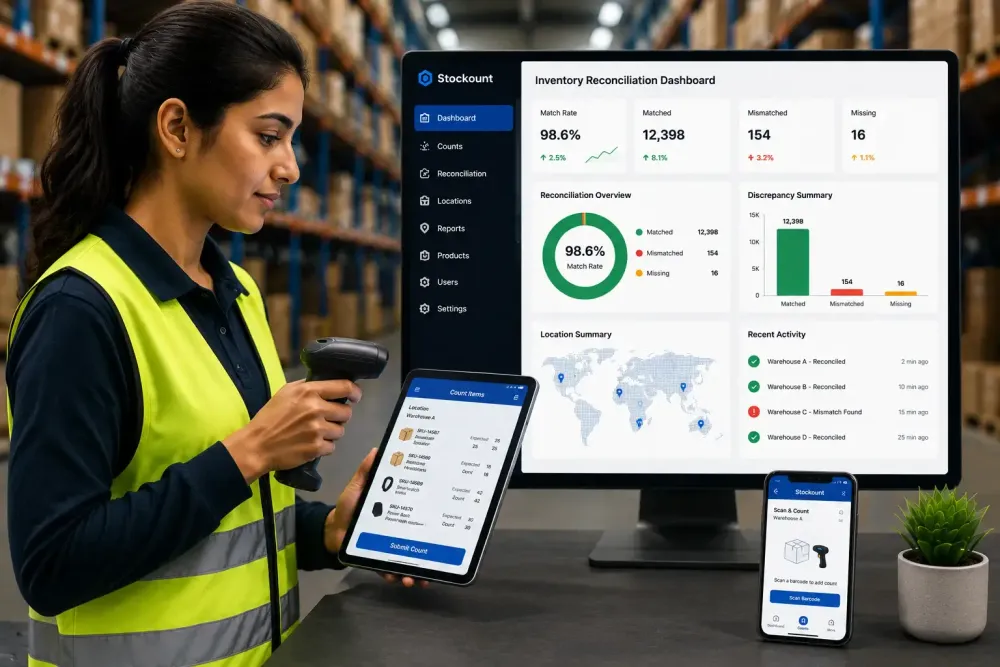
Your inventory system says you have 340 units of a product. The warehouse floor says you have 287. Somewhere between the receiving dock, the shelf, and the sales order, 53 units disappeared, and nobody can say exactly when or why.
This gap is not a minor inconvenience. It leads to stockouts, overselling, failed audits, and finance teams who can't trust the numbers in front of them. The longer discrepancies go unresolved, the harder they are to trace back to a cause.
Spreadsheets and manual counts were never built to catch this in real time. That's why more operations, warehouse, and finance teams are moving to inventory reconciliation software purpose-built systems that compare recorded and physical stock automatically, flag mismatches instantly, and keep every location's records audit-ready.
This guide breaks down what inventory reconciliation software is, how it works, and how to choose the right one.
Quick Answer
Inventory reconciliation software matches your recorded inventory data against actual physical stock, identifies discrepancies, and corrects records automatically. It uses barcode or QR scanning, mobile devices, and real-time syncing to speed up counts and reduce human error. Businesses use it to close the gap between what their system says they have and what's actually on the shelf, typically during cycle counts, audits, or full physical inventories.
What Is Inventory Reconciliation Software?
Inventory reconciliation software is a system that automatically compares your recorded inventory (from your ERP, POS, or accounting system) against your actual physical stock count, then highlights and helps resolve any discrepancies.
Instead of manually cross-checking spreadsheets against warehouse shelves, teams use barcode scanners, mobile devices, or handheld counters to capture real counts, which the software then matches against system records in real time.
Businesses typically use inventory reconciliation software during:
- Routine cycle counts
- Full physical inventory audits
- Multi-location stock transfers
- Month-end or year-end financial close
- Post-audit corrections after theft, damage, or miscounts
Why Accurate Inventory Records Matter
Inventory accuracy affects far more than the warehouse. It touches sales, finance, purchasing, and customer experience.
- Sales teams oversell products that don't actually exist in stock, damaging customer trust.
- Purchasing teams over-order or under-order based on incorrect on-hand quantities.
- Finance teams can't close the books confidently when inventory valuation doesn't match physical reality.
- Auditors flag unresolved discrepancies as control weaknesses during financial or compliance audits.
According to the National Retail Federation's National Retail Security Survey, U.S. retail shrink reached an estimated $112.1 billion in a single recent year, with process and administrative errors accounting for a meaningful share of that loss alongside theft. Inaccurate records aren't just a data problem, they're a direct hit to the bottom line.
Common Causes of Inventory Discrepancies
Discrepancies rarely come from one single source. The most common causes include:
- Manual counting errors — miscounts, transposed digits, illegible handwriting on count sheets
- Untracked transfers between warehouses, stores, or job sites
- Receiving errors — wrong quantities logged at intake
- Damaged or expired stock not written off in the system
- Theft or shrinkage, internal or external
- System lag between physical movement and digital update
- Duplicate or missing SKUs across locations or sales channels
- Unrecorded returns or exchanges Each of these compounds over time. A 1% error rate per count cycle sounds small — until it's applied across thousands of SKUs and dozens of locations.
How Inventory Reconciliation Software Works
Most inventory reconciliation software follows a similar core workflow:
- Capture the physical count — Staff use barcode scanners, QR codes, or mobile apps to scan and count stock on-site, including offline in low-connectivity warehouses.
- Sync with system records — Captured counts sync automatically (or on reconnect) with the central inventory database or ERP.
- Automated matching — The software compares physical counts against recorded quantities, SKU by SKU, location by location.
- Discrepancy flagging — Any mismatch is flagged instantly, often with the count date, user, and location attached.
- Investigation and adjustment — Teams review flagged items, determine the cause, and post corrected quantities.
- Audit trail logging — Every adjustment, scan, and user action is logged for compliance and future reference.
- Reporting — Dashboards summarize accuracy rates, discrepancy trends, and location-level performance. This turns reconciliation from a once-a-quarter fire drill into an ongoing, low-friction process.
Manual Inventory Reconciliation vs Software
| Factor | Manual Reconciliation | Inventory Reconciliation Software |
|---|---|---|
| Count method | Paper sheets or spreadsheets | Barcode/QR scanning, mobile devices |
| Speed | Slow, hours to days per location | Minutes to hours |
| Accuracy | Prone to human error | Significantly higher accuracy |
| Multi-location visibility | Fragmented, hard to consolidate | Centralized, real-time |
| Offline capability | Not applicable | Available in most modern tools |
| Audit trail | Manual documentation | Automatic, timestamped logs |
| Discrepancy detection | Delayed, often post-hoc | Instant flagging |
| Scalability | Breaks down at scale | Scales across SKUs and sites |
| Reporting | Manual compilation | Automated dashboards and exports |
Key Features to Look For
Barcode and QR scanning — Eliminates manual data entry errors by scanning items directly rather than typing SKUs or quantities.
Mobile inventory counting — Lets staff count using smartphones or handheld devices anywhere on the floor, instead of being tied to a desktop terminal.
Multi-location support — Consolidates counts and discrepancies across warehouses, stores, or job sites into one view.
Offline counting — Allows counts to continue in areas with poor or no connectivity, syncing automatically once back online.
Real-time synchronization — Updates central records the moment a count is completed, rather than in a nightly batch.
Audit trail — Records who counted what, when, and what changes were made — critical for compliance and dispute resolution.
Reports and analytics — Surfaces accuracy trends, shrinkage patterns, and location-level performance over time.
User permissions — Controls who can count, adjust, approve, or export data, reducing the risk of unauthorized changes.
Benefits of Inventory Reconciliation Software
- Faster reconciliation cycles — What took days can often be completed in hours.
- Higher inventory accuracy — Fewer errors from manual counting and data entry.
- Reduced stockouts and overselling — Sales teams work from numbers that reflect reality.
- Lower shrinkage — Faster detection means faster investigation and resolution.
- Audit-ready records — Every adjustment is logged and traceable.
- Better decision-making — Purchasing and planning teams work from accurate, current data.
- Time savings for staff — Less time spent on repetitive manual counts and spreadsheet reconciliation.
Industries That Benefit
- Retail — Multi-store chains reconciling stock across locations and back rooms
- Manufacturing — Raw material and finished goods tracking across production stages
- Warehouse and Distribution — High SKU volume, frequent inbound/outbound movement
- Wholesale — Bulk stock reconciliation across multiple buyers and depots
- Pharmacy — Regulatory-driven accuracy requirements for controlled and expiring stock
- Healthcare — Medical supply and equipment tracking across departments
- Food & Beverage — Perishable stock with expiry-driven reconciliation needs
- Construction — Equipment and materials tracked across job sites
- Automotive — Parts and components reconciliation across dealerships and service centers
Best Practices for Inventory Reconciliation
- Reconcile on a consistent schedule — don't wait for year-end.
- Use cycle counting for high-value or fast-moving SKUs more frequently.
- Standardize how discrepancies are logged and investigated.
- Assign clear ownership for reconciliation at each location.
- Use barcode or QR scanning wherever possible to remove manual entry.
- Reconcile immediately after large transfers or receiving events.
- Keep an audit trail for every adjustment, not just large ones.
- Review discrepancy trends monthly, not just totals.
- Train staff on the "why," not just the "how," of accurate counting.
- Choose software that scales with your SKU count and location count, not just your current size.
See How Stockount Simplifies Inventory Reconciliation
Whether you manage a single warehouse or multiple business locations, accurate inventory reconciliation is essential for maintaining reliable stock records and reducing operational costs.
Book a personalized demo to see how Stockount helps you automate inventory reconciliation with barcode scanning, mobile counting, and real-time inventory visibility.
✔ Reduce inventory discrepancies ✔ Improve stock accuracy ✔ Reconcile inventory across multiple locations ✔ Generate audit-ready reconciliation reports ✔ Save time with faster inventory counting
How to Choose Inventory Reconciliation Software
Buying Checklist
- Supports barcode and/or QR scanning
- Works offline in low-connectivity environments
- Handles multi-location reconciliation natively
- Integrates with your existing ERP or accounting system
- Provides a full audit trail of counts and adjustments
- Offers role-based user permissions
- Includes reporting and analytics dashboards
- Scales with growing SKU and location counts
- Provides mobile apps for count staff
- Has responsive support and onboarding
Must-Have Features
- Real-time sync between physical counts and system records
- Discrepancy flagging with location and user attribution
- ERP/accounting integration (Tally, Zoho, SAP, Odoo, QuickBooks, Dynamics 365, etc.)
- Exportable, audit-ready reports
Questions to Ask Vendors
- How does the system handle offline counting and syncing?
- Can it support our current number of locations and SKUs, and scale beyond that?
- What ERP or accounting systems does it integrate with out of the box?
- How is the audit trail structured, and can it be exported for compliance?
- What does onboarding and staff training look like?
Common Mistakes to Avoid
- Choosing software based on price alone, without checking integration compatibility
- Ignoring offline capability for warehouses with poor connectivity
- Underestimating the training time needed for count staff
- Not checking whether the audit trail meets your compliance requirements
- Skipping a pilot count before full rollout
Why Stockount
Stockount is built specifically around the reconciliation workflow, from first scan to final report.
- Barcode and QR Code Scanning — Count accurately without manual data entry.
- Mobile Counting — Staff count directly from smartphones, on the floor.
- Offline Counting — Counting continues even without a live connection, syncing once reconnected.
- Multi-location Management — See reconciliation status across every warehouse or store from one dashboard.
- Real-time Inventory Updates — Records reflect physical reality as counts happen, not after a batch job.
- Inventory Reconciliation — Automated matching between recorded and physical stock, with instant discrepancy flags.
- Inventory Audits — Structured audit workflows built for accuracy and compliance.
- Cloud Reporting — Dashboards and exportable reports for accuracy trends and audit history.
Start Your Free Trial Today
If your business is still relying on spreadsheets or manual inventory reconciliation, it's time to switch to a faster and more accurate solution.
Stockount helps businesses maintain accurate inventory records, reduce discrepancies, and simplify inventory reconciliation across warehouses and multiple locations.
✔ Barcode-Based Reconciliation ✔ Mobile Inventory Counting ✔ Multi-location Inventory Management ✔ Real-time Inventory Updates ✔ Audit-Ready Reports
Frequently Asked Questions
Q1: What is inventory reconciliation software? It's a system that compares recorded inventory against physical stock counts, flags discrepancies, and updates records, typically using barcode scanning and mobile devices instead of manual spreadsheets.
Q2: How does inventory reconciliation work? Staff count physical stock using scanners or mobile apps, the software matches those counts against system records, flags mismatches, and logs any adjustments made to correct them.
Q3: Why is inventory reconciliation important? It keeps sales, purchasing, and finance teams working from accurate numbers, reducing stockouts, overselling, and financial reporting errors caused by inventory discrepancies.
Q4: What causes inventory discrepancies? Common causes include manual counting errors, untracked transfers, receiving mistakes, damaged or expired stock, theft, and system lag between physical movement and digital records.
Q5: What is the difference between inventory reconciliation and inventory auditing? Reconciliation is the ongoing process of matching recorded and physical stock. Auditing is a broader, often periodic review that verifies reconciliation accuracy, controls, and compliance.
Q6: Can inventory reconciliation software integrate with ERP systems? Yes, most modern platforms integrate with ERP and accounting systems such as Tally, Zoho, SAP, Odoo, QuickBooks, and Dynamics 365.
Q7: What industries need inventory reconciliation software? Retail, manufacturing, warehousing, distribution, wholesale, pharmacy, healthcare, food & beverage, construction, and automotive all rely on it to maintain stock accuracy.
Q8: How often should inventory reconciliation be performed? High-value or fast-moving items are often reconciled through frequent cycle counts, while full reconciliation typically happens quarterly or at minimum annually, depending on business size.
Q9: How does barcode scanning improve inventory reconciliation? It removes manual data entry, reducing miscounts and mistyped SKUs, and speeds up the count process significantly compared to handwritten sheets.
Q10: Can small businesses use inventory reconciliation software? Yes. Many platforms, including Stockount, are built to scale from single-location small businesses to multi-location enterprises.
Q11: How do you reconcile inventory across multiple warehouses? Software with multi-location support consolidates counts from each site into one dashboard, letting teams compare and resolve discrepancies location by location or in aggregate.
Q12: What features should I look for in inventory reconciliation software? Barcode/QR scanning, offline counting, multi-location support, real-time sync, audit trails, ERP integration, and reporting dashboards are the core features to prioritize.
Conclusion
Inventory discrepancies aren't just a counting problem, they ripple into sales, purchasing, and financial reporting. Manual reconciliation was never designed to keep up with modern multi-location, multi-SKU operations.
Best inventory reconciliation software closes that gap. Barcode scanning, mobile counting, real-time syncing, and automatic discrepancy flagging turn reconciliation from a slow, error-prone task into a fast, reliable process, one that keeps every team working from the same accurate numbers.
If manual counts and spreadsheets are still running your reconciliation process, Stockount can help you move to something faster, more accurate, and audit-ready.