WMS vs Inventory Audit Software: A Clear Breakdown
| By Stockount
A mid-sized distributor spends six figures rolling out a new WMS. Picking gets faster. Shipping errors drop. Everyone's happy for about ten months.
Then the annual physical count happens.
Three thousand units are missing from what the system says should be there. Nobody can explain it. The WMS was supposed to fix exactly this.
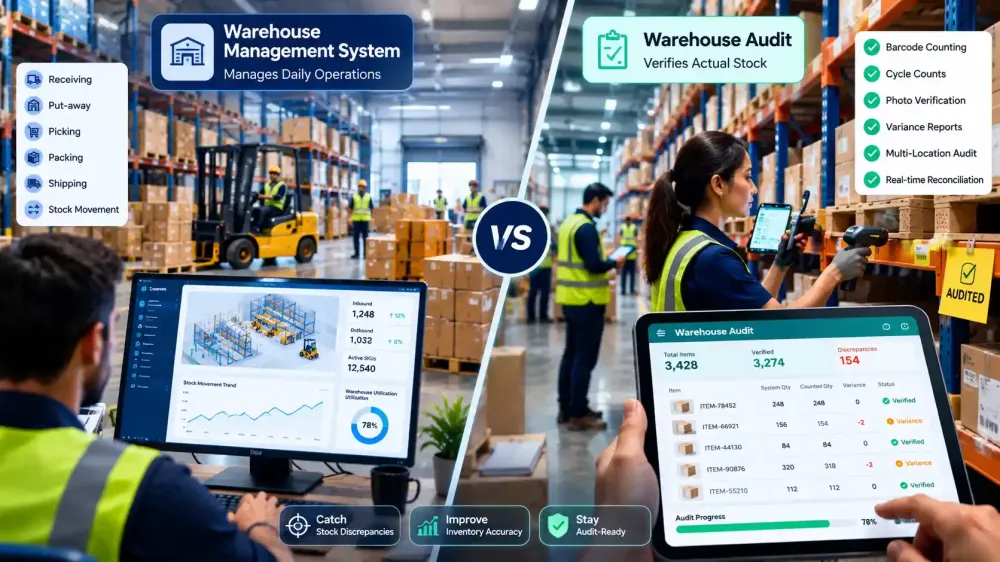
Here's the misconception that trips up a lot of warehouse teams: a WMS tells you what it thinks is on the shelf, based on every transaction it's logged. It doesn't know what's physically sitting there right now. Those are two different things, and the gap between them is where inventory audit software comes in.
This article breaks down what each system actually does, where they overlap, and how to figure out which one or which combination fits your operation.
What Is a Warehouse Management System?
A Warehouse Management System runs the operational side of a warehouse. It tells staff where to put incoming stock, which route to take when picking an order, and when to trigger a shipment.
Core functions typically include:
- Receiving — logging inbound stock as it arrives
- Put-away — assigning storage locations based on slotting rules
- Picking — generating optimized pick paths for order fulfillment
- Packing and shipping — verifying orders and printing labels
- Inventory movement tracking — updating stock counts as transactions happen Warehouse managers, pickers, and floor supervisors are the primary daily users. For a business running high order volumes across a large facility, a WMS is what keeps operations from turning into chaos.
The limitation is built into how it works. A WMS records what it's told. If a picker scans the wrong bin, or a return gets shelved without a scan, or a pallet gets damaged and quietly pulled off the floor, the WMS has no way of knowing. It keeps reporting the last number it was given, even after reality has moved on.
What Is Inventory Audit Software?
Inventory audit software exists to answer one specific question: does what the system says match what's actually there?
It's built around counting, not moving. Typical capabilities include:
- Barcode scanning for fast, accurate counts on the floor
- Cycle counting — counting a subset of SKUs on a rotating schedule instead of shutting down for a full count
- Offline counting for warehouses with patchy connectivity in far corners of a facility
- Variance reports that flag exactly where system records and physical counts disagree
- Photo verification to document discrepancies at the shelf level
- Audit trails showing who counted what, and when
- Multi-location audits for businesses running several stores or warehouses under one account Retailers, distributors, and manufacturers use dedicated audit software because counting well is its own skill set. A WMS is optimized for throughput. Audit software is optimized for accuracy verification a different job entirely, even though both deal with the same inventory.
WMS vs Inventory Audit Software: Side by Side
| Factor | WMS | Inventory Audit Software |
|---|---|---|
| Primary purpose | Runs day-to-day warehouse operations | Verifies stock accuracy |
| Main users | Pickers, warehouse staff, supervisors | Auditors, inventory controllers, store managers |
| Inventory counting | Logged as a byproduct of transactions | Built as the core function |
| Barcode support | Often present, workflow-focused | Present, count-accuracy focused |
| Offline capability | Rare, usually requires connectivity | Common, built for remote/patchy zones |
| Audit trail | Transaction logs | Dedicated variance and count history |
| Variance reporting | Limited or absent | Core feature |
| Reconciliation | Manual, often in spreadsheets | Automated, built into the workflow |
| Multi-location support | Depends on plan/vendor | Standard across most audit tools |
| Implementation time | Weeks to months | Days |
| Typical cost | $20K–$250K+ | Low-cost SaaS, fast to deploy |
Neither system is "better." They're solving different problems that happen to sit next to each other on the same warehouse floor.
Why a WMS Alone Doesn't Eliminate Inventory Errors
A WMS is only as accurate as the data fed into it. In real warehouses, that data breaks down constantly, in small ways that add up.
A picker scans a similar-looking SKU by mistake. The system now thinks two different products are in two wrong locations, and nobody notices until someone goes looking for stock that isn't there.
Returns are another common leak. A customer sends something back, it gets shelved by a staff member in a hurry, and the scan step gets skipped. The WMS never logs it. From the system's point of view, that unit doesn't exist.
Damaged inventory causes the same problem in reverse. Stock gets pulled off the shelf and set aside for write-off, but the adjustment doesn't happen right away, sometimes it never happens at all.
Add in manual overrides during busy periods, inventory shrinkage from theft or miscounts, and the sheer volume of transactions in a large facility, and it's easy to see why an annual audit at a WMS-run warehouse can still turn up thousands of units in discrepancies. The WMS did its job perfectly. It just never claimed to catch what happens outside its own transaction log.
Still Finding Inventory Discrepancies?
If cycle counts or annual audits keep turning up numbers that don't match your WMS, the gap usually isn't a WMS problem — it's a counting problem.
Stockount runs barcode-based inventory audits on top of whatever system you're already using. Counts go faster with mobile scanning, discrepancy reports show up in real time instead of after the fact, and multi-location businesses can run audits across every site from one dashboard. No rip-and-replace, no long onboarding.
Start Your Free Trial — 15 days, no credit card required.
Can WMS and Inventory Audit Software Work Together?
Yes, and for most businesses running any real volume, this is the setup that actually works.
The WMS keeps handling receiving, picking, and shipping — the operational engine. Inventory audit software runs on top, periodically checking whether the numbers the WMS is reporting still match physical reality.
This works cleanly in practice because most audit tools are built to sit alongside existing infrastructure rather than replace it. Integration usually happens through:
- ERP connections — syncing item masters and stock levels with platforms like Odoo or Zoho
- Barcode scanner compatibility — using the same hardware already on the floor
- APIs and CSV imports — for businesses with custom or in-house systems The result is a warehouse where the WMS keeps things moving fast, and the audit layer keeps the underlying numbers honest. Neither one does the other's job, but together they close the loop that either one alone leaves open.
Which Solution Is Right for Your Business?
| Business Type | Recommended Solution |
|---|---|
| Retail (single location) | Inventory audit software — WMS is often overkill at this scale |
| Multi-store retail chains | WMS + audit software — audit tool handles cross-location reconciliation |
| Wholesale distributors | WMS + audit software — high SKU volume makes both necessary |
| Manufacturing | WMS + audit software — raw material, WIP, and finished goods each need separate tracking accuracy |
| 3PL providers | WMS (often required by clients) + audit software for client-facing accuracy reporting |
| Franchise operations | Audit software with multi-location support — standardizes counts across independently run sites |
| Growing SMBs | Start with audit software — lighter setup, faster ROI, add a WMS later if order volume demands it |
| Enterprise operations | Both, tightly integrated — scale makes manual reconciliation unworkable |
The pattern here: the bigger and more distributed the operation, the more both systems earn their keep independently.
Features to Look for in Inventory Audit Software
Not all audit tools are built the same way. When evaluating options, look for:
- Offline counting mode for warehouse zones with weak signal
- Barcode scanning through phone cameras or external scanners
- Cycle counting workflows so counts don't require shutting down operations
- Real-time reconciliation rather than end-of-day batch processing
- Detailed audit logs showing who counted what and when
- Photo evidence for disputed or damaged stock
- A usable mobile app — floor staff will avoid clunky tools
- Role-based permissions so counters, supervisors, and auditors see what they need
- Multi-location support if you run more than one site
- Dashboards and reports that make variances easy to spot and act on
- ERP integration so counts flow back into your existing system of record
Why Businesses Choose Stockount
Stockount is built around inventory accuracy, not warehouse execution which is a deliberate choice rather than a limitation. But accuracy alone doesn't tell the full story of what happens once a count is done, which is why audit, inventory management, and finance sit on the same platform instead of three separate tools.
The audit side covers the details already mentioned: barcode-based counting, offline mode for weak-signal zones, photo verification for disputed items, and reconciliation reports that flag variances without requiring a spreadsheet afterward.
Once a count closes, the inventory management layer picks it up updating stock levels, tracking items across locations, and keeping a live record of what's on hand without needing a separate system to reflect the corrected numbers.
The finance layer is what usually gets bolted on as an afterthought elsewhere. Here, stock adjustments and variance write-offs flow directly into the finance module, so a shortage found during an audit doesn't sit in a spreadsheet waiting for someone to manually update the books. Audit, inventory, and finance stay in sync because they're the same platform, not three tools exporting data to each other.
Multi-location businesses run all of this across every site from a single account, with role-based access so store managers, auditors, and finance teams each see what's relevant to them.
It's designed to work alongside an existing WMS or ERP setup, including Odoo and Zoho, rather than compete with it. A WMS still owns receiving, picking, and shipping. Stockount owns making sure the numbers behind those operations, physical stock, inventory records, and the financial impact of any gap between them, actually hold up. Onboarding is built around getting a first audit running quickly, not a multi-month rollout.
Improve Inventory Accuracy Without Replacing Your WMS
Most businesses in this situation don't need to tear out what they've already built. They need a better way to check it.
If your current counts are slow, your discrepancy reports show up too late to act on, or you're running audits across multiple locations with no single view of the results, that's a counting problem not a warehouse operations problem.
FAQs
Q1: What is the difference between WMS and inventory audit software? A WMS manages warehouse operations, receiving, picking, packing, and shipping. Inventory audit software focuses specifically on verifying that physical stock matches system records, through counting, scanning, and variance reporting. One runs operations; the other checks accuracy.
Q2: Can inventory audit software replace a WMS? Not for businesses with meaningful order volume. A WMS handles picking routes, shipping logistics, and warehouse workflow that audit software isn't built for. Audit software is a verification layer, not an operations engine — the two solve different problems.
Q3: Do I need both systems? It depends on scale. Small, single-location businesses can often run on audit software alone. Larger or multi-location operations typically need a WMS for daily operations plus audit software to keep those operations honest.
Q4: Can inventory audit software integrate with ERP? Yes. Most audit tools connect with ERP platforms like Odoo and Zoho, syncing item data and stock levels so counts and reconciliations flow back into the system of record without manual re-entry.
Q5: How does barcode inventory counting improve accuracy? Barcode scanning removes manual entry errors — the most common source of miscounts. It also speeds up counts significantly, which means audits happen more often and catch discrepancies before they compound.
Q6: Can inventory audit software work offline? Good audit tools support offline counting for warehouse zones with weak or no connectivity, syncing data once a connection is available. This matters in large facilities where signal doesn't reach every corner.
Q7: How often should warehouse audits be conducted? It varies by business, but cycle counts on a rotating schedule (weekly or monthly for high-value or fast-moving SKUs) catch problems faster than relying on a single annual physical count.
Q8: Is Stockount suitable for multi-location businesses? Yes. Stockount is built to run audits across multiple stores or warehouses from one account, with consolidated reporting so discrepancies across locations are visible in one place rather than scattered across separate spreadsheets.
Q9: What causes inventory discrepancies even with a WMS in place? Common causes include mis-scanned items, unlogged returns, damaged stock removed without an adjustment, manual overrides during busy periods, and shrinkage. A WMS records transactions as they're reported it can't catch what never gets logged.
Q10: Does adopting audit software mean replacing existing systems? No. Audit software is typically layered on top of an existing WMS or ERP rather than replacing it, connecting through APIs, CSV imports, or direct ERP integration.