Barcode Scanning vs. Manual Stock Counting: Which Is Better for Inventory Accuracy?
| By Stockount
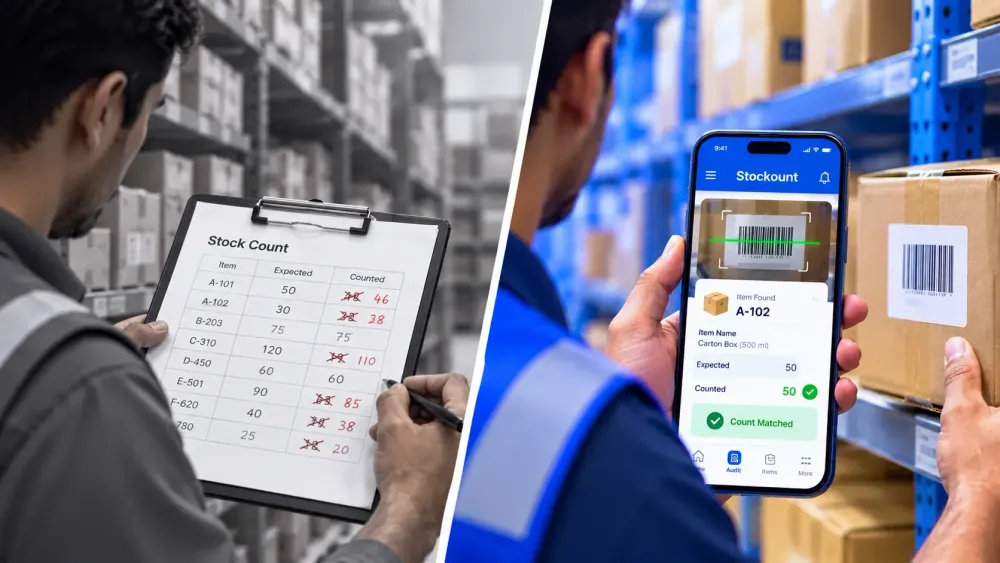
Barcode scanning is not more accurate by default. Neither is a careful team with clipboards. Inventory accuracy depends on three jobs done well: identifying the right item, recording the right quantity, and resolving differences against the system before they reach the books.
The real difference in barcode scanning vs manual stock counting is who does those jobs. Manual counting leaves all three to people. Barcode scanning hands the first to a label and a scanner, supports the second, and leaves the third to your process.
That split matters more as operations grow. Human errors creep in at every handwritten or retyped figure, counts stretch across days while stock keeps moving, and discrepancies multiply when the same count runs across several stores or warehouses.
Below, we compare manual stocktaking vs barcode scanning job by job, on speed, error risk, traceability, cost and scalability, show where each of these inventory counting methods fits, and explain when it is time to switch.
What Is Manual Stock Counting?
Manual stock counting means people physically count items and record quantities by hand, on paper count sheets or by typing directly into a spreadsheet. The recorded figures are then compared with system stock, usually after the count is finished.
A typical manual inventory counting process looks like this:
- Print a count sheet or export a stock list from the ERP or accounting software.
- Assign counters to aisles, racks or sections.
- Count each item and write the quantity against the item code or description.
- Re-enter the handwritten figures into a spreadsheet or system.
- Compare counted quantities with system quantities and investigate differences.
Where it is commonly used: small retail shops with a few hundred SKUs, businesses running their first stocktake, items without labels (loose hardware, raw materials, bulk goods), and quick spot checks on a single shelf.
The main advantage is that it needs almost nothing to start. The main weakness is that every quantity passes through a human hand at least twice: once when counted and again when re-keyed. Each handoff is a chance for an error.
What Is Barcode-Based Inventory Counting?
Barcode inventory counting replaces handwritten identification with a scan. Each product, carton or bin carries a barcode label that encodes an identifier. On consumer goods this is often a GTIN in an EAN-13 or UPC barcode, and 2D codes can also carry batch numbers, expiry dates and serial numbers (GS1 Sweden).
A barcode-based count usually works like this:
- Scan the label. A handheld scanner or a phone camera reads the barcode and identifies the exact item.
- Capture the quantity. The counter enters the quantity, or scans once per unit so the count increments automatically.
- Validate against records. The software checks that the barcode matches a known item and flags unknown codes or unexpected locations.
- Sync the data. Where the system supports it, counts sync to a central dashboard or ERP, either live or once the device reconnects.
Barcode vs. RFID: not the same thing. Barcode scanning for inventory management needs a clear line of sight: the scanner must see each label, one at a time. RFID tags carry an Electronic Product Code that can be read without a direct line of sight, and many tags can be read at once. GS1 notes that barcodes cost less to produce and can be read by most scanners already in use, so the right choice depends on the application (GS1 support). For most retailers, distributors and SMB warehouses, barcodes are the practical first step in automated stock counting.
Barcode Scanning vs. Manual Stock Counting: Key Differences
The table below compares barcode vs manual inventory counting on the factors operations and finance teams usually weigh. Results in practice depend on label quality, team discipline and the software used.
| Factor | Manual stock counting | Barcode scanning |
|---|---|---|
| Counting speed | Slows as SKU count grows; counters must find, read and write each item code | Faster per item once labels are in place; identification is a single scan |
| Data entry errors | Risk at two points: writing the count and re-keying it later; similar codes are easily confused | Identification errors largely removed; quantity entry and mislabelled items can still cause errors |
| Labour requirements | More counter hours plus separate time for data entry and checking | Fewer hours on entry and re-keying; time needed upfront for labelling and training |
| Audit traceability | Limited: paper sheets rarely show who counted what, when, or what changed | Each scan can be logged with user, time and location when the software records it |
| Real-time visibility | Results are known only after sheets are collected and entered | Progress and variances can be visible during the count if the system syncs |
| Multi-location scalability | Hard to coordinate and consolidate across sites | Standardised process and central reporting make multi-site counts easier to run |
| Initial implementation costs | Very low: paper, pens, spreadsheets | Higher: labels, printers, scanners or phones, and software; phone cameras can lower hardware cost |
| Best suited to | Small catalogues, unlabelled goods, one-off or very small counts | Growing SKU volumes, frequent or cycle counts, multiple locations, audit-sensitive stock |
Advantages and Limitations of Manual Stock Counting
Manual counting is not obsolete. It remains a sensible choice in a few situations:
- Very small inventories. A single boutique with a few hundred items can complete a careful count in an afternoon.
- Unlabelled or loose goods. Raw materials sold by weight, bulk fasteners or produce may not carry scannable labels.
- Occasional spot checks. Verifying one shelf after a customer complaint does not justify a full rollout.
- Zero upfront budget. There is nothing to buy or configure.
The limitations show up as the operation grows:
- Transcription errors. A 6 read as an 8, or a quantity written against the wrong row, flows straight into the stock records.
- Look-alike items. In a distribution warehouse, two SKUs that differ only by size or pack quantity are easy to mix up by description alone.
- Long count windows. Large counts can take days, and stock keeps moving while the count is in progress.
- Weak audit trail. It is difficult to prove who counted an item, when, and whether a figure was altered afterwards.
- Slow consolidation. Merging sheets from several stores into one view adds days before anyone can act on variances.
Benefits and Limitations of Barcode Inventory Counting
The main benefits of barcode inventory counting come from removing guesswork from item identification:
- Speed. Scanning a label is quicker than finding and writing an item code, especially for long or similar codes.
- Standardised data capture. Every counter records items the same way, which makes results comparable across teams and sites.
- Less manual entry. Counts are captured digitally at the shelf, so there is no second round of typing.
- Traceability. Scans can be time-stamped and tied to a user and location, which supports investigations and external audits.
- Better inventory counting accuracy for similar items. A barcode separates two near-identical SKUs that a person might confuse.
Among the barcode scanning benefits for warehouses, the last point often matters most: pallets of look-alike cartons are where manual errors cluster.
Barcodes also come with real requirements:
- Implementation effort. Items need labels, the item master needs barcode values, and teams need training.
- Label quality. Faded, torn, curled or poorly printed labels fail to scan, tempting counters to type codes manually.
- Scanning discipline. Scanning one unit and keying "12" for a mixed carton, or scanning the same box twice, still produces wrong counts.
- Line of sight. Each label must be reachable and visible, which is slow for high racking or tightly stacked stock.
- Reconciliation still matters. A scan records what was counted; someone still has to investigate and resolve variances against system stock.
In short, barcode scanning reduces some of the most common error sources, but it does not guarantee accuracy on its own.
When Should Businesses Switch to Barcode-Based Stock Counting?
There is no single SKU threshold. These signs usually mean manual counting is costing more than it saves:
- Growing SKU volumes. New variants, sizes and pack formats make look-alike items harder to tell apart by eye.
- Frequent stock discrepancies. The same items show variances count after count, and nobody can trace the cause.
- Multiple warehouses or stores. Consolidating paper sheets from each site delays decisions by days.
- Repetitive audits. Monthly or cycle counting multiplies the effort of every manual step.
- Limited visibility into stock movements. You only learn about shortages at month-end or year-end, after the loss has grown.
Many businesses do not switch overnight. A hybrid approach works well: scan barcoded fast-movers first, keep manual counting for unlabelled items, and label the rest as you go.
Not sure which method fits your stock? Bring your current count sheet or SKU list to a 20-minute Stockount demo and see how a barcode-based count would run on your own items.
How Inventory Audit Software Improves Barcode-Based Counting
A scanner on its own only reads labels. Software turns those scans into a controlled count. In general, a good platform supports:
- Audit assignments. Allocating zones, racks or SKU lists to specific counters so nothing is counted twice or missed.
- Barcode scanning and validation. Checking each scan against the item master and flagging unknown codes.
- Stock comparison. Showing system quantity against counted quantity, ideally without revealing the system figure to counters (a blind count).
- Audit trails. Recording who counted, when and where, plus every adjustment made afterwards.
- Reporting. Summarising variances by item, location and value for finance and operations.
- Multi-location workflows. Running counts across sites with consolidated results.
These are general capabilities; not every tool offers all of them. For the full workflow around a count, see our guide to the inventory audit process, and the difference between stock counting and inventory auditing.
How Stockount Helps Simplify Inventory Audits
Stockount is built for the barcode inventory audit workflow described above. Here is how its confirmed features map to common counting problems:
- No budget for dedicated scanners? Teams can scan with a phone, tablet or laptop camera. Existing USB and Bluetooth handheld scanners also work.
- Barcodes carry batch or expiry data? Configurable barcode parsing can read batch, serial, expiry or unit of measure from a single barcode, which helps pharma and FMCG counts.
- Not everything is labelled yet? Static mode lists items up front for non-barcoded floors, while Dynamic mode suits scanning. Stockount can also generate and print barcode labels during an audit for items missing them.
- Long runs of identical items? Continuous count mode increments quantity on repeated scans of the same item.
- Weak Wi-Fi in the warehouse? The mobile app supports offline counting and syncs when the connection returns.
- Need proof for a variance? Photo cross-checking and cross audits add a second layer of verification.
- Variances pile up after the count? Each variance lands on a resolution screen with Accept, Recount or Investigate actions.
- Several sites and counters? Multi-user counting, multi-branch management, a real-time dashboard and audit summary reports keep everyone on one plan.
In one published case, Velavan Motorcycles, a Royal Enfield dealer, reduced a 7-day manual audit to 2 days after moving to a scan-based process (case study). Results depend on each operation's setup.
For a step-by-step method you can use with or without software, read how to conduct an accurate stock audit, or browse all Stockount features.
Ready to simplify your inventory audits? Explore Stockount and book a demo to see how it fits your inventory workflow.
Frequently Asked Questions
Is barcode scanning more accurate than manual stock counting?
Yes, for identifying items. A scan removes handwriting, misreading and re-keying errors, and it tells look-alike SKUs apart. Quantity entry, label quality and reconciliation still decide final accuracy, so barcode counting works best with clear labels and a variance review after each count.
Does barcode scanning eliminate inventory discrepancies?
No. It cuts errors made during the count, but discrepancies also come from theft, damage, receiving mistakes and stock moved without a record. Barcode data makes those causes easier to trace, yet someone still has to investigate and reconcile each variance.
Is barcode inventory counting worth it for a small business?
Often, yes, if you count more than once or twice a year or stock similar-looking products. Phone-camera scanning keeps hardware costs low. For a very small catalogue counted once a year, careful manual counting may still be enough.
What equipment do I need for barcode stock counting?
You need three things: barcode labels on items or bins, a device to read them (a handheld scanner or a smartphone camera), and software that records and validates each count. Add a label printer if many items are not yet labelled.
Can I use my smartphone as a barcode scanner for stock counting?
Yes. Most counting apps read barcodes through the phone camera, which is enough for many retail and SMB warehouse counts. Dedicated handheld scanners are quicker for long, high-volume sessions. Stockount supports both camera scanning and external USB or Bluetooth scanners.
How much does it cost to switch from manual counting to barcode scanning?
Costs come from labels, an optional label printer, reading devices and counting software. Using phones your team already has removes most hardware cost, so software and labelling are usually the main expense. For Stockount plan details, see the pricing page.
Can barcode scanning work across multiple warehouses?
Yes, when every site counts into one shared system. Each warehouse scans locally and results consolidate into one view, so you can compare variances by location without merging spreadsheets.
Is barcode scanning suitable for cycle counting?
Yes. Cycle counts are small and frequent, so the time saved on each scan adds up over every round. Digital records also make it easier to spot items that show variances count after count.
Try Barcode-Based Counting on Your Own Stock
The quickest way to settle barcode scanning vs manual stock counting for your business is to run one real count. Stockount offers a 7-day free trial with full access and no credit card required.