Zoho Inventory Stock Verification
Zoho Inventory manages your records. Stockount verifies them. Scan barcodes, count physical stock from any mobile device, run a stock audit against your Zoho Inventory quantities, and reconcile the difference before it becomes a problem.
Built for accurate physical stock verification and audit-ready inventory operations.
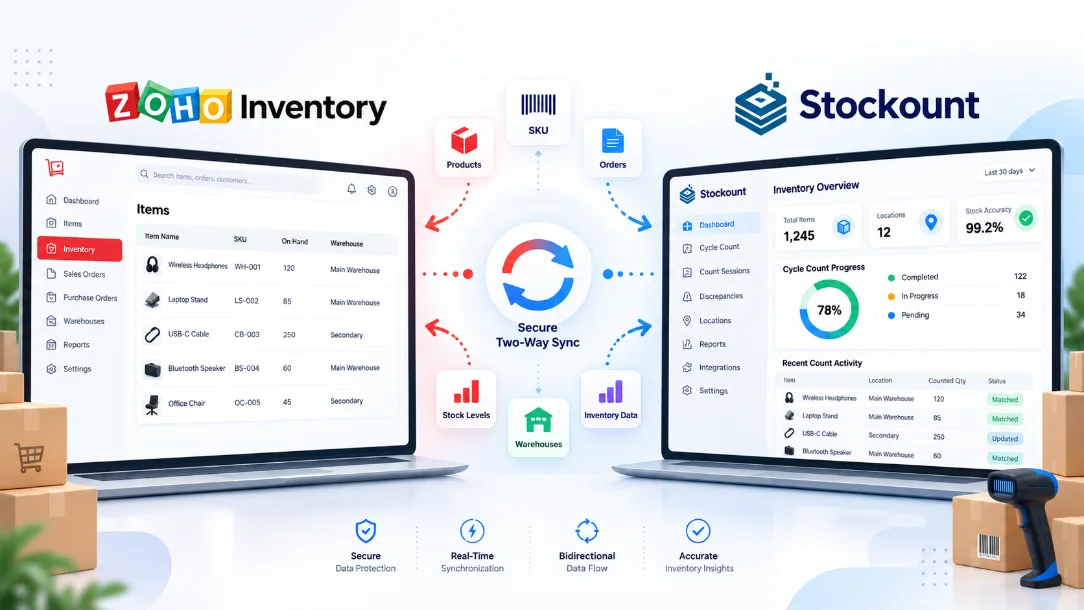
From Zoho Inventory Records to Verified Stock Accuracy
Zoho Inventory keeps your records. Stockount checks them against reality with physical stock verification.
Connect Your Zoho
Bring your Zoho Inventory data into Stockount and get your products ready for physical counting.
Simplify Physical Counts
Give your team a clear, structured workflow for mobile inventory counting — scan barcodes, count, and record physical stock with ease.
Find Stock Discrepancies
Compare physical counts with Zoho Inventory and quickly spot shortages, overages, and quantity differences.
Post Adjustments to Zoho
Review verified count differences in Stockount and post the required inventory adjustments directly to Zoho Inventory.
Structure Your Zoho Inventory Stock Audit With Stockount
Connect your inventory source, organize your warehouse audit, and get clear visibility into inventory variances.
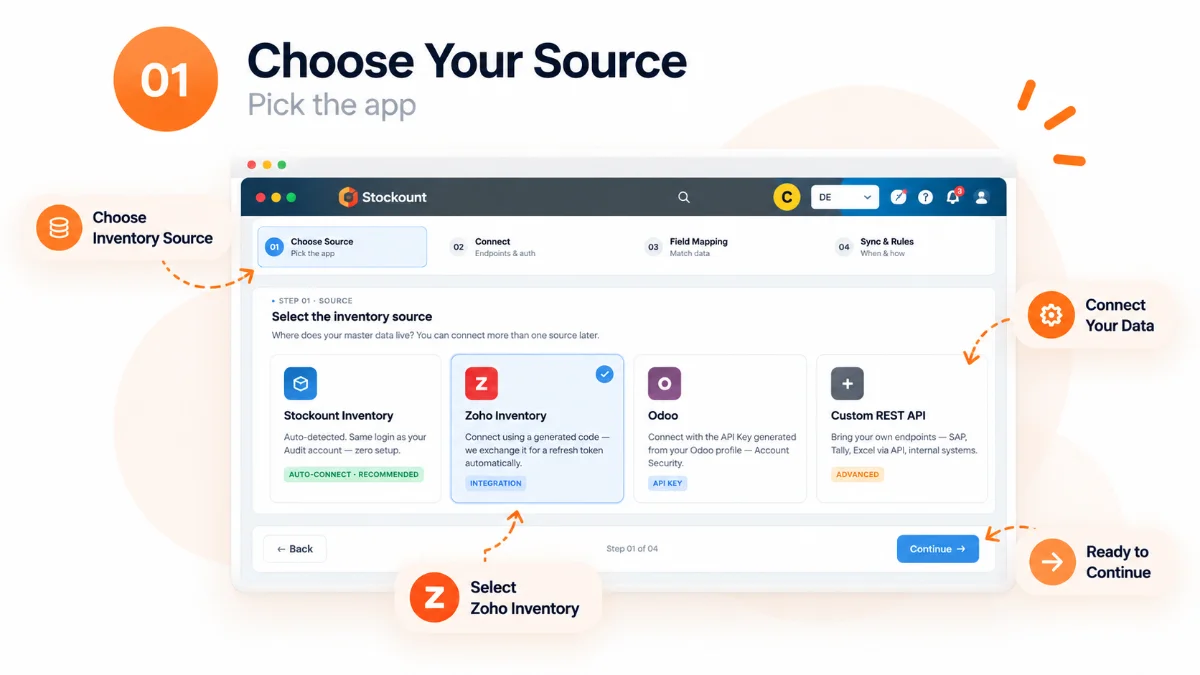
Everything You Need for Zoho Inventory Stock Verification
Multi-Location Counting
Run multi-location inventory audits across warehouses, stores, and every other stock location you manage.
Multiple Users
Let multiple team members count inventory at the same time and keep the audit process organized.
Floor Plan-Wise Audits
Organize barcode stock counting by warehouse or store areas to make physical counts easier to manage.
Category-Wise Counting
Focus your count on specific product categories instead of counting everything at once.
Complete & Cycle Counts
Run full Zoho Inventory stock audits or regular cycle counting based on your needs.
Discrepancy Detection
Compare physical quantities with Zoho Inventory records and quickly identify stock differences.
Inventory Reconciliation
Review and verify variances in Stockount for clean stock reconciliation before making inventory changes.
Post Adjustments to Zoho
Once differences are verified, post the required inventory adjustments back to Zoho Inventory.
Zoho Records It.
Stockount Verifies It.
Post Adjustments.
Bring your Zoho Inventory data into Stockount, count your physical stock, identify differences, and post the verified adjustments back to Zoho Inventory.
Book 20-Min Demo

Why Businesses Use Stockount for Zoho Inventory Stock Verification
Reduce Manual Work
Replace spreadsheet-heavy counting with a simple digital process that helps teams record physical stock and hold inventory accuracy without extra admin.
Speed Up Inventory Audits
Give your inventory teams a consistent workflow to verify physical stock and complete Zoho Inventory audits with less effort.
Catch Stock Discrepancies
Identify stock discrepancies during physical verification, helping your team catch inventory issues before they affect operations.
Simplify Stock Reconciliation
Review count differences, verify discrepancies, and approve adjustments before syncing the final changes back to Zoho Inventory.
Built for Different Businesses and Inventory Systems
Running multiple businesses, companies, warehouses, or inventory operations?
Stockount helps you bring accuracy to your physical inventory counts across different business environments and inventory systems.
Keep every warehouse stock count organized, verified, and accurate with Stockount.
Frequently Asked Questions
What is Zoho Inventory stock verification?
Zoho Inventory stock verification is the process of counting the stock physically present in your warehouse or store and comparing it against the quantities recorded in Zoho Inventory. Stockount runs that count and shows you exactly where the two differ.
Why use Stockount for Zoho Inventory stock verification?
Zoho Inventory manages your inventory records. Stockount adds the physical verification layer, giving your team a structured way to count stock, detect variances, and reconcile inventory accurately.
Can I run a Zoho Inventory stock audit from a mobile device?
Yes. Stockount is mobile-first stock verification software. Your team can scan barcodes and record physical quantities from the warehouse floor, aisle by aisle.
Does Stockount identify stock variances against Zoho Inventory?
Yes. Stockount compares physical counts with your Zoho Inventory quantities and highlights every product where the counted stock does not match the record.
Can I do cycle counting instead of a full stock count?
Yes. Stockount supports both complete inventory audits and regular cycle counting, so you can verify by category, floor plan area, or location instead of counting everything at once.
How does inventory reconciliation work?
Once a count is complete, your team reviews and verifies each variance in Stockount. After the differences are confirmed, the required inventory adjustments can be posted back to Zoho Inventory.
Can I verify stock across multiple locations and companies?
Yes. Stockount supports multi-location inventory verification, so you can keep one consistent counting process across warehouses, stores, branches, and multiple companies.
Who should use Zoho Inventory stock verification software?
Retail, wholesale, distribution, warehousing, manufacturing, and multi-location businesses that run periodic stocktakes or regular inventory audits on Zoho Inventory.
Make Every Zoho Inventory Stock Count More Accurate
Connect Zoho Inventory with Stockount and give your team a simpler way to count, audit, and improve inventory accuracy.